> For the complete documentation index, see [llms.txt](https://onestore-dev.gitbook.io/dev/llms.txt). Markdown versions of documentation pages are available by appending `.md` to page URLs; this page is available as [Markdown](https://onestore-dev.gitbook.io/dev/chi/tools/alc.md).
# ALC Developer Guide
**ALC概要**
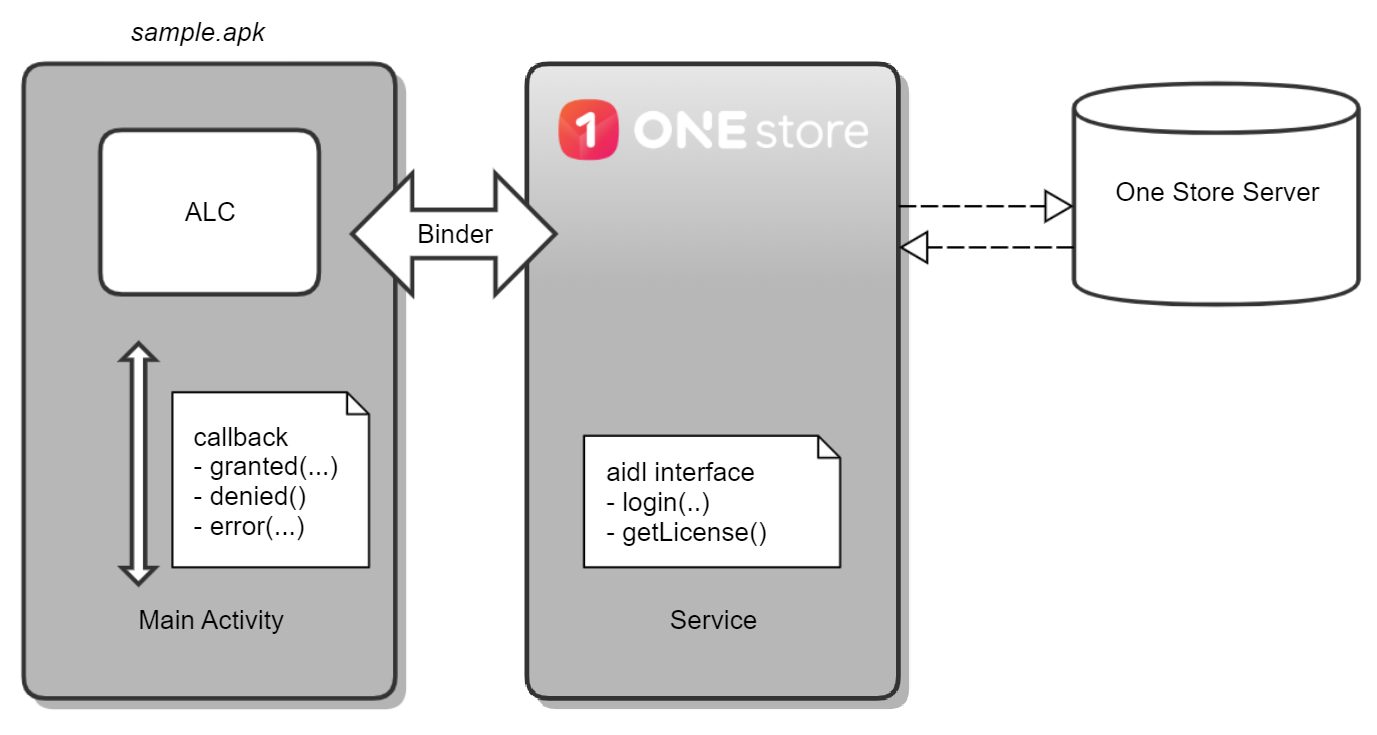
* ONE store提供许可证服务(Application License Checker)为软件执行许可证政策。通过ALC服务,可以实时确认使用软件的用户是否拥有有效的许可证,然后适当地判断是否追加使用。ONE store ALC以网络为基础提供服务,向ONE store服务器询问并判断当前用户是否拥有有效的许可证。软件向智能手机安装的“ONE store service”发送询问请求,而“ONE store service”则向“ONE store”智能手机发送请求,并接收结果。
 *
```
ALC Library
```
```
ONE store为用户提供可下载的Library,使用户轻松地在软件上确认许可证。Library将承担所有软件在ONE store service和ONE store服务器通讯所需的所有功能,软件只需利用Library提供的api来确认用户的许可证是否有效。
* #### **设置开发及测试环境**
* 建议的开发环境 : 软件应用ALC Library,需如下开发环境:
* Android 5.0以上版本(API版本需21以上)
* Java SDK 1.6 版本
* Android studio 3.0 以上版本
*
```
ALC Library
```
```
ONE store为用户提供可下载的Library,使用户轻松地在软件上确认许可证。Library将承担所有软件在ONE store service和ONE store服务器通讯所需的所有功能,软件只需利用Library提供的api来确认用户的许可证是否有效。
* #### **设置开发及测试环境**
* 建议的开发环境 : 软件应用ALC Library,需如下开发环境:
* Android 5.0以上版本(API版本需21以上)
* Java SDK 1.6 版本
* Android studio 3.0 以上版本
* ### **设置**
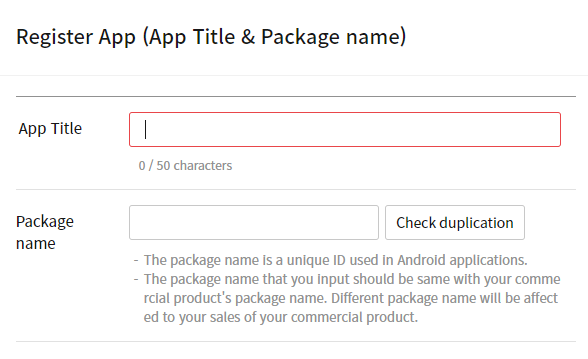
* 在Apps >“商品注册”里输入要注册的App商品和包名。
```
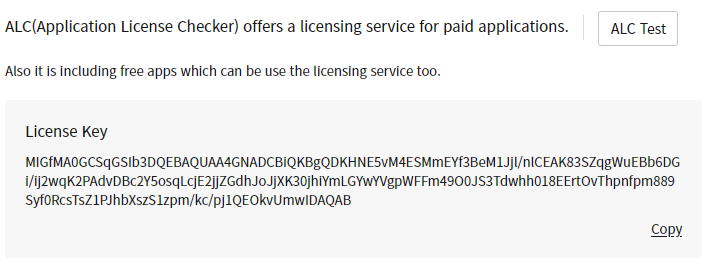
 * 选择注册的App后,在“商品现状”>“许可证管理”菜单里确认许可证密钥。许可证密钥是使用ALC Library的所必备条件。
 * 根据 ALC Library 应用指南开发软件。ALC Library 应用指南请参考[这里](http://172.21.139.64:8090/wiki/en/pages/viewpage.action?pageId=38077708)。用户可以在销售软件前确认其是否应用许可证。可以在"许可证管理"菜单下的"ALC测试管理"里注册测试员。完成注册测试员后,无论是否购买该软件 都将被处理为测试员对该软件拥有正常的许可证,而删除测试员时,许可证也将被删除。
*
```
* 根据 ALC Library 应用指南开发软件。ALC Library 应用指南请参考[这里](http://172.21.139.64:8090/wiki/en/pages/viewpage.action?pageId=38077708)。用户可以在销售软件前确认其是否应用许可证。可以在"许可证管理"菜单下的"ALC测试管理"里注册测试员。完成注册测试员后,无论是否购买该软件 都将被处理为测试员对该软件拥有正常的许可证,而删除测试员时,许可证也将被删除。
*
```
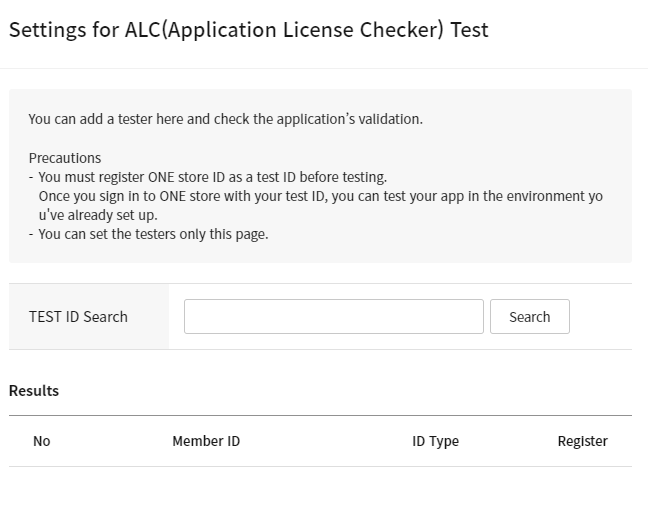 ```
* 使用Test ID查询要使用的Test ID(ONE store用户账号)\
\* 请将ONE store的帐号注册为测试帐号(可使用的ID类型:ONE store,Naver,facebook,google ID)
* 确认已查询的测试ID后,点击“注册”按钮,注册成为测试员。注册成功的测试员可以在测试ID管理进行删除。
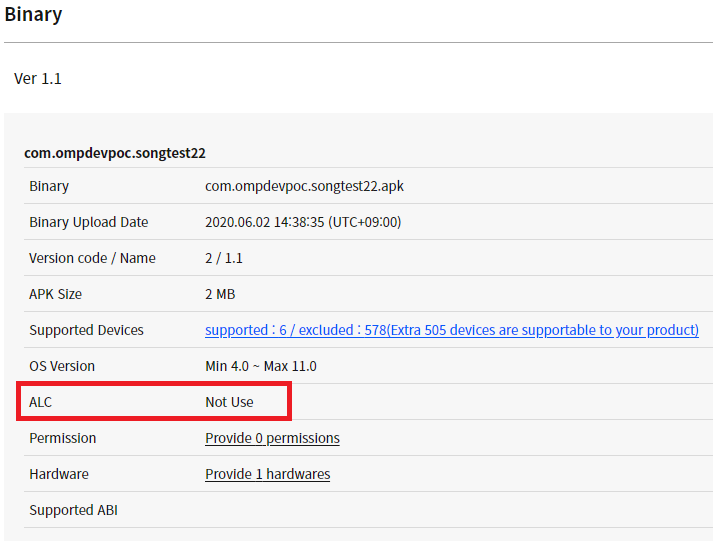
* 为了销售App,用户可以上传APK,并检查是否应用ALC。
* 应用ALC时:显示Library内api版本(ex. 1)
* 未应用ALC时:显示为未应用
* \
\
```
* 使用Test ID查询要使用的Test ID(ONE store用户账号)\
\* 请将ONE store的帐号注册为测试帐号(可使用的ID类型:ONE store,Naver,facebook,google ID)
* 确认已查询的测试ID后,点击“注册”按钮,注册成为测试员。注册成功的测试员可以在测试ID管理进行删除。
* 为了销售App,用户可以上传APK,并检查是否应用ALC。
* 应用ALC时:显示Library内api版本(ex. 1)
* 未应用ALC时:显示为未应用
* \
\
 *
* #### **应用前注意事项**
* A应用ALC SDK前,请确认以下内容。
* 由于ALC是基于网络的服务,确认许可证时需要处于联网状态。而未连接网络时,用户可以使用许可证缓存进行操作。
* ALC测试员注册只适用于单个软件。要在不同的软件中进行ALC测试时,需要在相关App商品的“许可证管理”菜单里重新注册测试员。
* ALC测试环境与进行In-App测试的Sandbox无关。
* “ONE store service”必须已经安装在用户设备中。通信公司销售的智能手机基本上都内置“ONE store service”,但在针对境外市场的智能手机及平板里没有内置,因此必须通过以下链接下载最新版本。[下载](http://m.onestore.co.kr/mobilepoc/etc/downloadGuide.omp?PrePageNm=/main)
* ### **ALC Library应用指南**
* [ALC(Application License Checker) V2 应用](/dev/chi/tools/alc/add-alc-library-dependency.md)
* [Unity中使用 ALC SDK V2](/dev/chi/tools/alc/using-alc-sdk-v2-in-unity.md)
* [升级到ALC V2](/dev/chi/tools/alc/upgrading-from-v1-to-v2.md)
* [在 Unity 中升级到 ALC SDK V2](/dev/chi/tools/alc/using-alc-sdk-v2-in-unity.md)
* [说明ALC V2 Reference](/dev/chi/tools/alc/alc-v2-reference.md)
* ### **下载 ALC**
* ALC(Application License Checker) Library可通过[git hub](https://github.com/ONE-store/app_license_check)下载。
*
* #### **应用前注意事项**
* A应用ALC SDK前,请确认以下内容。
* 由于ALC是基于网络的服务,确认许可证时需要处于联网状态。而未连接网络时,用户可以使用许可证缓存进行操作。
* ALC测试员注册只适用于单个软件。要在不同的软件中进行ALC测试时,需要在相关App商品的“许可证管理”菜单里重新注册测试员。
* ALC测试环境与进行In-App测试的Sandbox无关。
* “ONE store service”必须已经安装在用户设备中。通信公司销售的智能手机基本上都内置“ONE store service”,但在针对境外市场的智能手机及平板里没有内置,因此必须通过以下链接下载最新版本。[下载](http://m.onestore.co.kr/mobilepoc/etc/downloadGuide.omp?PrePageNm=/main)
* ### **ALC Library应用指南**
* [ALC(Application License Checker) V2 应用](/dev/chi/tools/alc/add-alc-library-dependency.md)
* [Unity中使用 ALC SDK V2](/dev/chi/tools/alc/using-alc-sdk-v2-in-unity.md)
* [升级到ALC V2](/dev/chi/tools/alc/upgrading-from-v1-to-v2.md)
* [在 Unity 中升级到 ALC SDK V2](/dev/chi/tools/alc/using-alc-sdk-v2-in-unity.md)
* [说明ALC V2 Reference](/dev/chi/tools/alc/alc-v2-reference.md)
* ### **下载 ALC**
* ALC(Application License Checker) Library可通过[git hub](https://github.com/ONE-store/app_license_check)下载。