# ONE store In-App支付概要

## **ONE store In-App支付是什么？** <a href="#onestoreinapp-zhi-fu-gai-yao-onestoreinapp-zhi-fu-shi-shen-me" id="onestoreinapp-zhi-fu-gai-yao-onestoreinapp-zhi-fu-shi-shen-me"></a>

One store的In-App支付(In-App Purchase, IAP)是一种利用One store认证和支付系统，向用户销售android应用程序内商品，并向开发者付费的服务。

In-App商品支付需要与One store服务(ONE store service, OSS) 应用软件进行联动，One store服务应用软件与One store支付服务器联合执行In-App商品的支付。

为了使用One store的In-App支付， 需要应用"One store IAP SDK(In-App Purchase Software Development Kit)"。&#x20;

## **In-App商品的类型** <a href="#onestoreinapp-zhi-fu-gai-yao-inapp-shang-pin-de-lei-xing" id="onestoreinapp-zhi-fu-gai-yao-inapp-shang-pin-de-lei-xing"></a>

One store In-App支付API V7（SDK V21）提供管理型商品和订阅型商品两种类型的In-App商品。 首先，请您确认每个类型都具有哪些特性，然后尝试构建符合您所提供的App商品的In-App商品目录。\
&#x20;

| 区分                 | 内容                                                                                                                                                                |
| ------------------ | ----------------------------------------------------------------------------------------------------------------------------------------------------------------- |
| 管理型商品              | <p>在购买后消费(consume)之前不会再购买的App商品。要想重新购买该App商品，需要进行消费(consume)处理。<br>利用管理型商品的特性，可提供消费性/永久性/固定期限类型的In-App商品。</p>                                                     |
| 包月型商品 (Deprecated) | <p>一旦加入，每月自动支付一定金额的App商品，自动支付更新（再支付）由One store处理。<br>应用SDK V21 (API V7)后，无法创建新的包月型商品。(现有包月型商品可继续使用。) <br>可使用订阅型商品提供定期支付商品。 </p>                                   |
| 订阅型商品              | <p>从SDK V21(API V7)开始提供的定期支付商品类型。<br>按照规定的周期在One store进行定期支付，为吸引新客户提供促销功能及变更支付手段等用户便利功能。<br>订阅型商品的详细内容请参考<a href="/pages/wsqOpVE4GpwZEAmLQuZp">适用定期支付</a>的页面。</p> |

## **支付流程** <a href="#onestoreinapp-zhi-fu-gai-yao-zhi-fu-liu-cheng" id="onestoreinapp-zhi-fu-gai-yao-zhi-fu-liu-cheng"></a>

One store In-App支付大致由以下四个流程组成。&#x20;

### One store会员登录 <a href="#onestoreinapp-zhi-fu-gai-yao-onestore-hui-yuan-deng-lu" id="onestoreinapp-zhi-fu-gai-yao-onestore-hui-yuan-deng-lu"></a>

为了使用One store In-App支付服务，必须已经注册成One store会员并处于登录的状态。\
如果收到与登录失败相关的错误代码(RESULT\_NEED\_LOGIN)，请调用登录过程以便登录到One store，或者引导客户运行One store应用软件登录。

#### **引导用户运行One store应用软件登录**

利用dialog等，将"您需要登录One store会员"传递给用户。该方法为用户提供简单的指南，并引导用户直接运行One store应用软件。

#### **使用launchLoginFlowAsync调用登录流程**

开发公司将使用launchLoginFlowAsync API来调用登录画面。\
用户完成登录后，可以通过IapResultLIstener（在调用API时将其放入parameter中）传递结果值。\
如果在验证结果代码值后确认为成功，之后就可以使用One store  In-App支付SDK的API。\
下图显示了开发公司应用软件和One store之间的登录流程。 \
&#x20;

<figure><img src="/files/ozEOHQkrWZzRAAWoFTOi" alt=""><figcaption></figcaption></figure>

### 请求购买In-App商品 <a href="#onestoreinapp-zhi-fu-gai-yao-qing-qiu-gou-mai-inapp-shang-pin" id="onestoreinapp-zhi-fu-gai-yao-qing-qiu-gou-mai-inapp-shang-pin"></a>

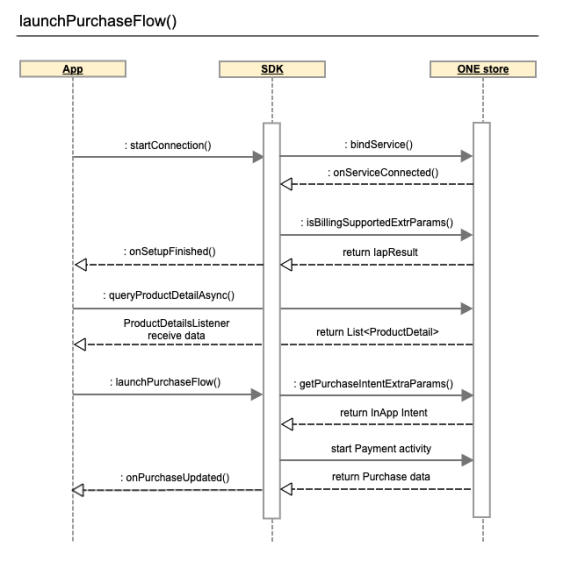
如果想要购买App商品，请先调用商品详细信息(queryProductDetailAsync) API，然后拿着收集到的商品信息，通过launchPurchaseFlow API调用购买页面。\
支付完成后，您可以通过在初始化PurchaseClient对象时输入的PurchasesUpdatedListener获得购买信息。\
验证结果代码值后，如果确认成功，之后进行发放相当于In-App商品的item的流程。 下图是购买开发公司应用软件和One store之间In-App商品的流程。   \
&#x20;

<figure><img src="/files/xwb8ev2CwBMyff6UpaQp" alt=""><figcaption></figcaption></figure>

### 确认购买In-App商品  <a href="#onestoreinapp-zhi-fu-gai-yao-que-ren-gou-mai-inapp-shang-pin" id="onestoreinapp-zhi-fu-gai-yao-que-ren-gou-mai-inapp-shang-pin"></a>

使用One store IAP library V6以上版本，需要3天内确认购买。如果没有确认购买，购买金额将退还给客户。\
使用以下两种方法可以确认购买。&#x20;

* **消费 (consume)**&#x20;
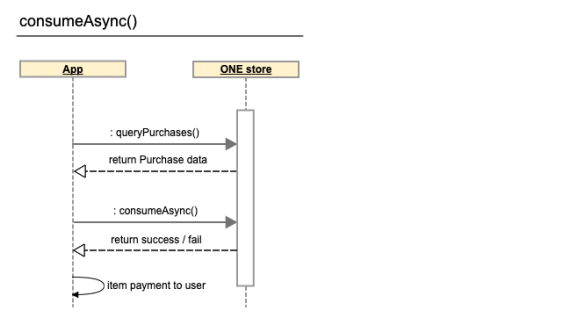
  * 管理型商品的特征是，在购买后消费（consume）前不能再购买。 因此，提供管理型商品中可重复购买的消费性商品时，必须使用PurchaseClient.consumeAsync（）进行消费处理后，客户才能重新购买该商品。&#x20;
  * 安装启动消费性类型的商品时，需要在购买流程完成后立即消费掉购买的商品，并在消费完成后发放item。&#x20;
  * 建议用户在运行应用软件（游戏）时或登录应用软件（游戏）时调用上述API，事先确认是否存在未支付的App商品，并添加支付App商品的流程。

<figure><img src="/files/kTfqe9TN769rRvzqCFmd" alt=""><figcaption></figcaption></figure>

* **确认购买商品 (acknowledge)**
  * 不是消费性商品时，请使用PurchaseClient.acknowledgeAsync（）。可以不进行消费处理，仅通过购买确认的方法实现永久性商品。
  * 安装启动永久性类型商品时，需进行确认购买（acknowledge）而不是消费。
  * 订阅类商品也需要确认购买，仅需对首次支付进行确认购买即可。&#x20;

<figure><img src="/files/z22y9AmkNRF5LKJ2R10K" alt=""><figcaption></figcaption></figure>

{% hint style="info" %}
因网络中断或App突发非正常终止关闭等原因，有可能发生客户已完成支付，但传递给开发公司的支付信息发生传递遗漏，导致无法支付In-App商品的情况。 建议使用购买信息导入（queryPurchases）及消费（consume）功能确认是否有购买完成却未发放的商品，对于未发放的商品需要按照流程进行。
{% endhint %}

### 订阅型商品管理 <a href="#onestoreinapp-zhi-fu-gai-yao-ding-yue-xing-shang-pin-guan-li" id="onestoreinapp-zhi-fu-gai-yao-ding-yue-xing-shang-pin-guan-li"></a>

订阅型商品(subscription)在首次购买后,根据商品支付周期定期更新支付。

One store为用户提供定期支付商品管理画面，具有暂停支付、解除订阅、变更支付手段等多种功能。  &#x20;

可以调用launchManageSubscription API或deep link，提供定期支付管理菜单。&#x20;

## **推荐开发环境** <a href="#onestoreinapp-zhi-fu-gai-yao-tui-jian-kai-fa-huan-jing" id="onestoreinapp-zhi-fu-gai-yao-tui-jian-kai-fa-huan-jing"></a>

为了应用One store IAP SDK，需要以下开发环境。

* Android 6.0以上版本(API版本23以上)
* [Java SDK 11版本](http://www.oracle.com/technetwork/java/javase/downloads/index.html)
* [Android studio 2.0以上版本](https://developer.android.com/studio/index.html)


---

# Agent Instructions: Querying This Documentation

If you need additional information that is not directly available in this page, you can query the documentation dynamically by asking a question.

Perform an HTTP GET request on the current page URL with the `ask` query parameter:

```
GET https://onestore-dev.gitbook.io/dev/chi/tools/billing/v21/ov.md?ask=<question>
```

The question should be specific, self-contained, and written in natural language.
The response will contain a direct answer to the question and relevant excerpts and sources from the documentation.

Use this mechanism when the answer is not explicitly present in the current page, you need clarification or additional context, or you want to retrieve related documentation sections.