> For the complete documentation index, see [llms.txt](https://onestore-dev.gitbook.io/dev/llms.txt). Markdown versions of documentation pages are available by appending `.md` to page URLs; this page is available as [Markdown](https://onestore-dev.gitbook.io/dev/chi/tools/one-billing-lab.md).
# ONE Billing Lab指南
 #### 📌 ONE Billing Lab作为研发工具,可以帮助研发人员更容易确认ONE store服务各国家In-App支付库综合状态。
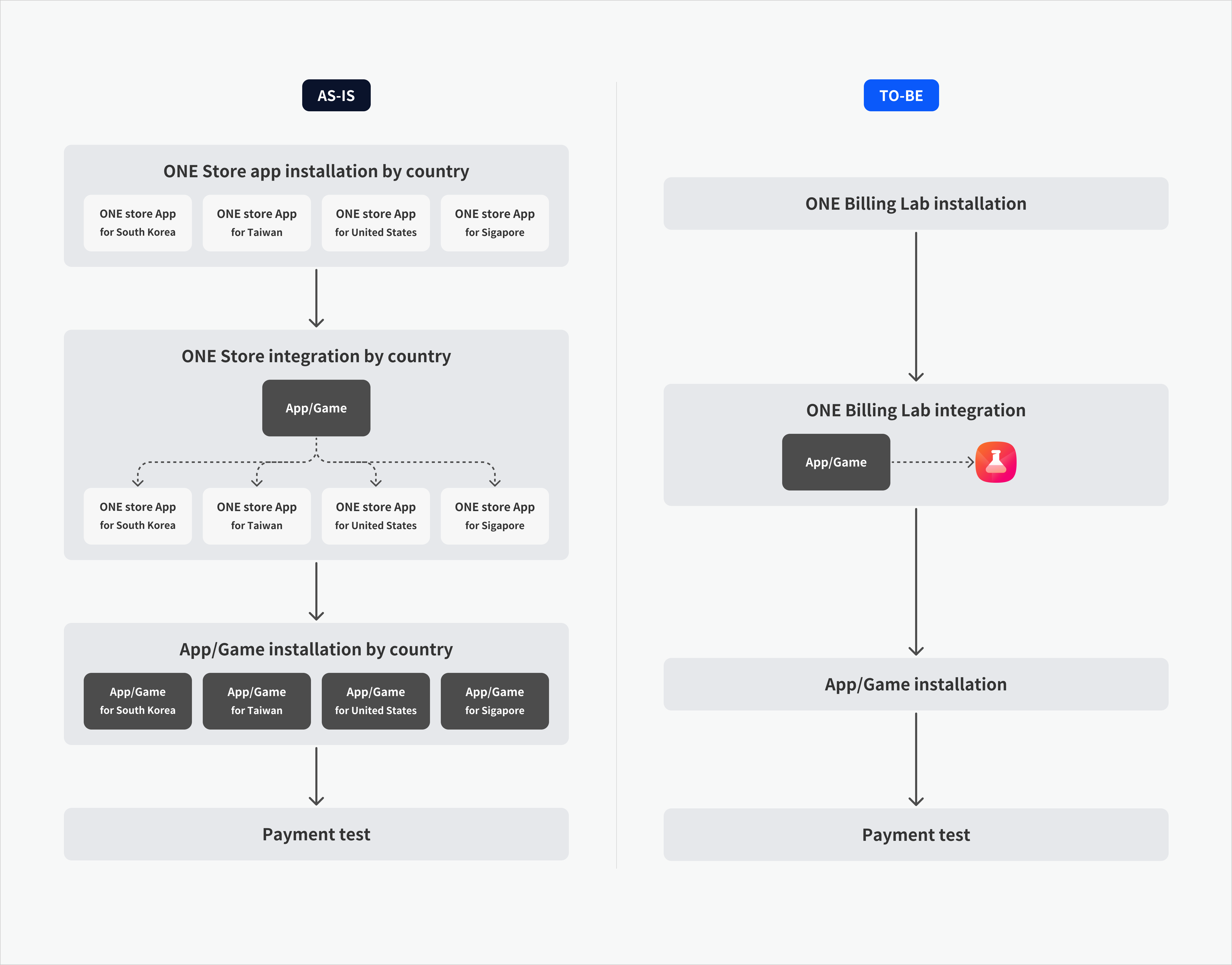
* 不需要单独安装各服务国用的ONE store App,以希望国家会员登录后就可以进行支付测试。
* 没联动实际ONE store支付系统,也可以通过ONE Billing Lab的响应模拟程序功能测试支付流程。
#### 📌 ONE Billing Lab作为研发工具,可以帮助研发人员更容易确认ONE store服务各国家In-App支付库综合状态。
* 不需要单独安装各服务国用的ONE store App,以希望国家会员登录后就可以进行支付测试。
* 没联动实际ONE store支付系统,也可以通过ONE Billing Lab的响应模拟程序功能测试支付流程。
 ## **功能介绍**
**✅ 综合测试环境**
* 大韩民国、新加坡、台湾、美国等所有ONE store环境中,可以仅通过ONE Billing Lab App进行测试。
* 提供统一的测试环境,减少研发公司们因各store套餐名不同而带来的测试困难。
**✅ 响应模拟程序**
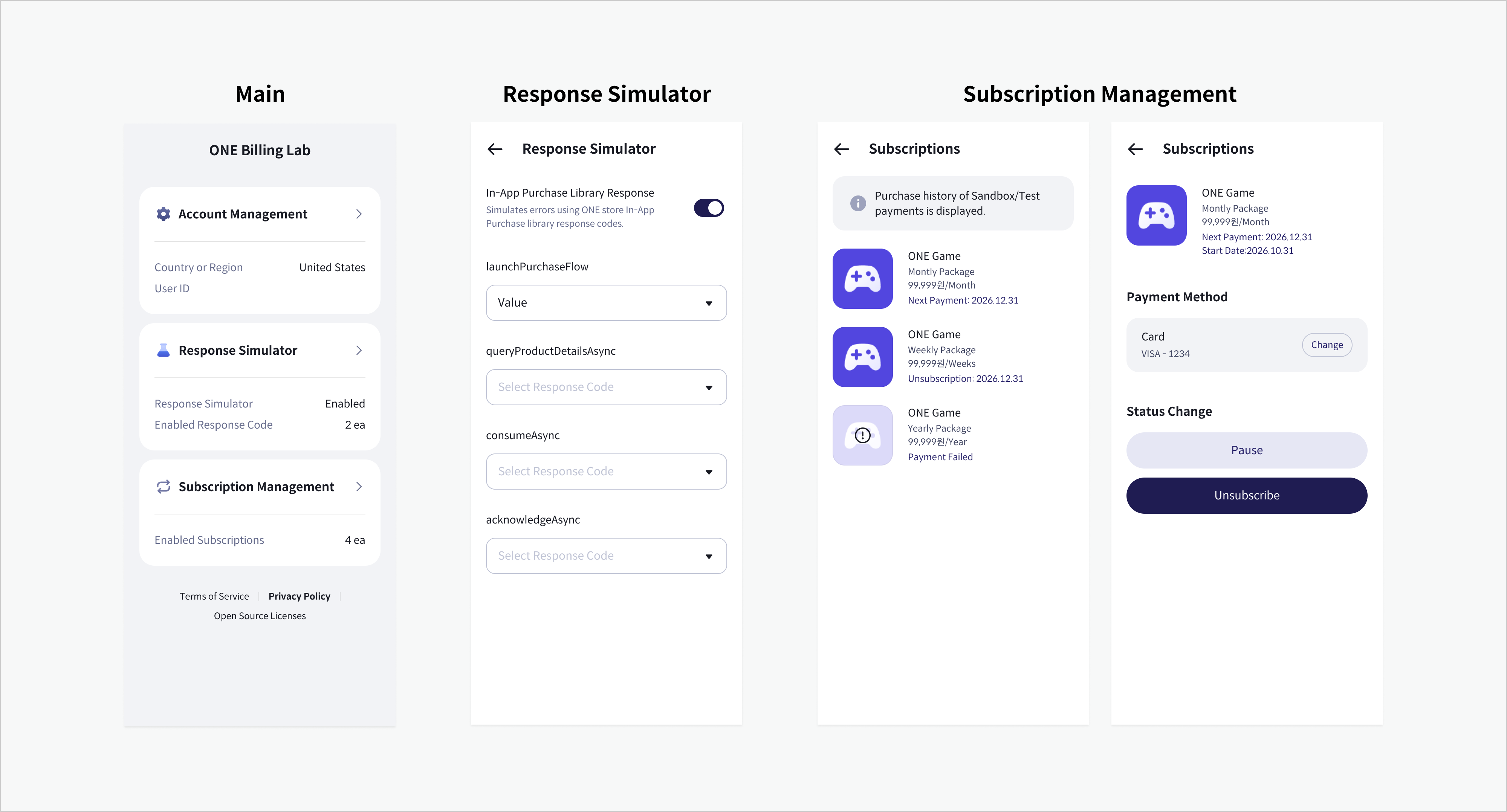
* 可以不通过实际支付过程,测试In-App支付场景。
* 在研发和QA环境中测试支付响应动作时使用。
**✅ 诸多支付场景测试**
* 可以测试定期支付管理、用户认证、生物认证等诸多支付相关功能。
* 定期支付管理菜单仅在以大韩民国和美国会员登录时显示。
## **功能介绍**
**✅ 综合测试环境**
* 大韩民国、新加坡、台湾、美国等所有ONE store环境中,可以仅通过ONE Billing Lab App进行测试。
* 提供统一的测试环境,减少研发公司们因各store套餐名不同而带来的测试困难。
**✅ 响应模拟程序**
* 可以不通过实际支付过程,测试In-App支付场景。
* 在研发和QA环境中测试支付响应动作时使用。
**✅ 诸多支付场景测试**
* 可以测试定期支付管理、用户认证、生物认证等诸多支付相关功能。
* 定期支付管理菜单仅在以大韩民国和美国会员登录时显示。
 ## **测试方法**
 ### 1. 安装ONE Billing Lab
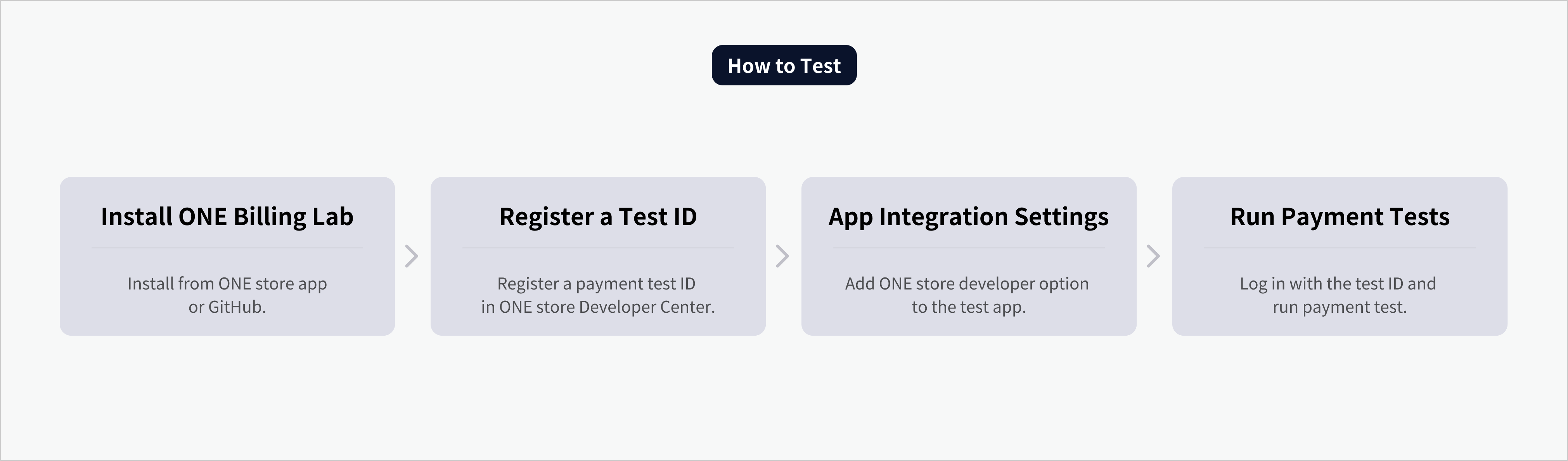
* 在ONE store App或GitHub下载安装ONE Billing Lab。
* [在ONE store App安装](https://onesto.re/0001002700)
* [在GitHub安装](https://github.com/ONE-store/one_billing_lab)
### 2. 生成及登录ONE store账户
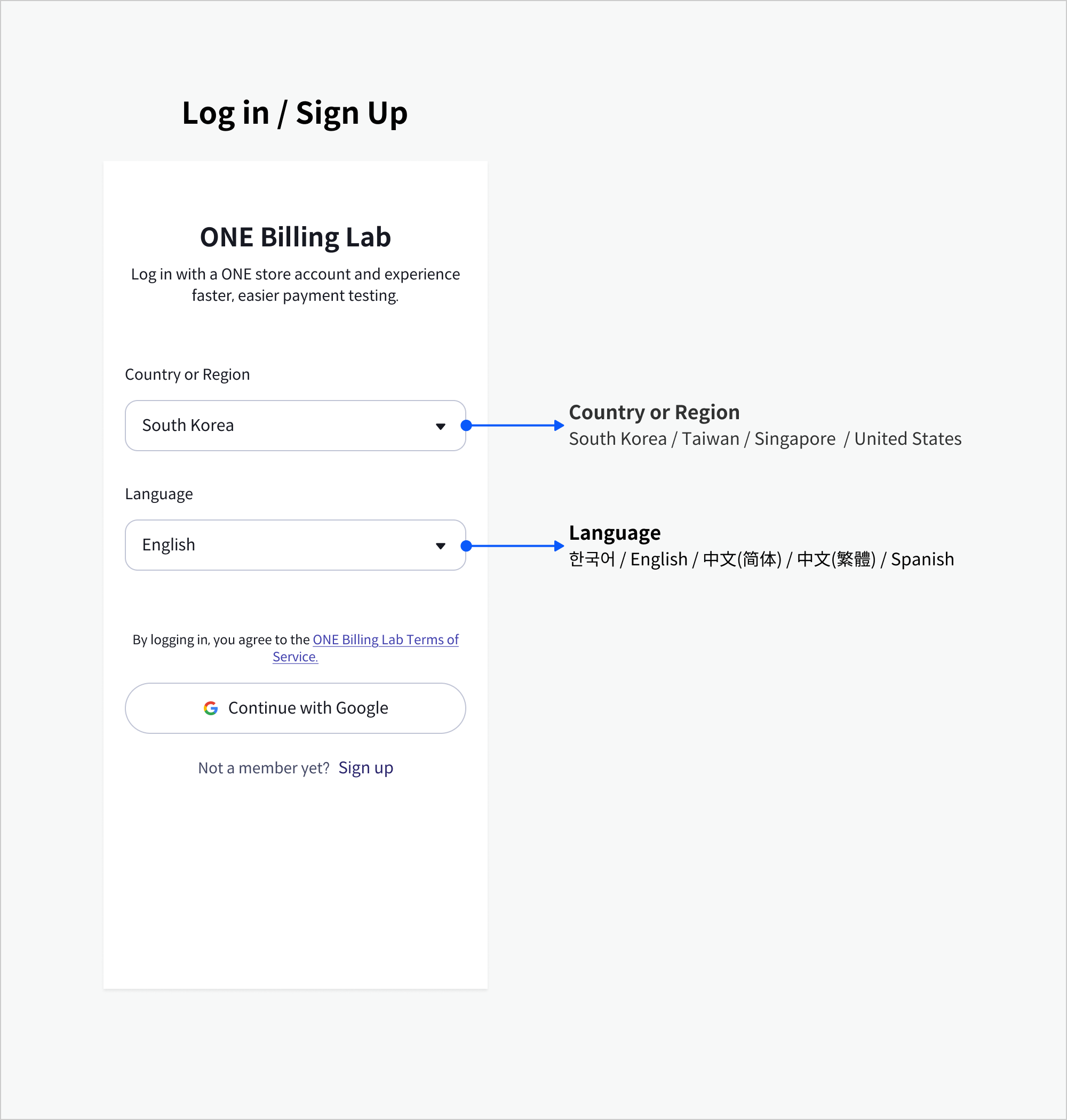
* 启动ONE Billing Lab后,选择测试国家或地区,生成或登录ONE store账户。
* ONE Billing Lab会员和原有会员一致。
* 若原有ONE store账户,可以直接进行第三阶段。
* 没有账户的,可在ONE Billing Lab简单加入会员。
### 1. 安装ONE Billing Lab
* 在ONE store App或GitHub下载安装ONE Billing Lab。
* [在ONE store App安装](https://onesto.re/0001002700)
* [在GitHub安装](https://github.com/ONE-store/one_billing_lab)
### 2. 生成及登录ONE store账户
* 启动ONE Billing Lab后,选择测试国家或地区,生成或登录ONE store账户。
* ONE Billing Lab会员和原有会员一致。
* 若原有ONE store账户,可以直接进行第三阶段。
* 没有账户的,可在ONE Billing Lab简单加入会员。
 ### 3.注册测试ID
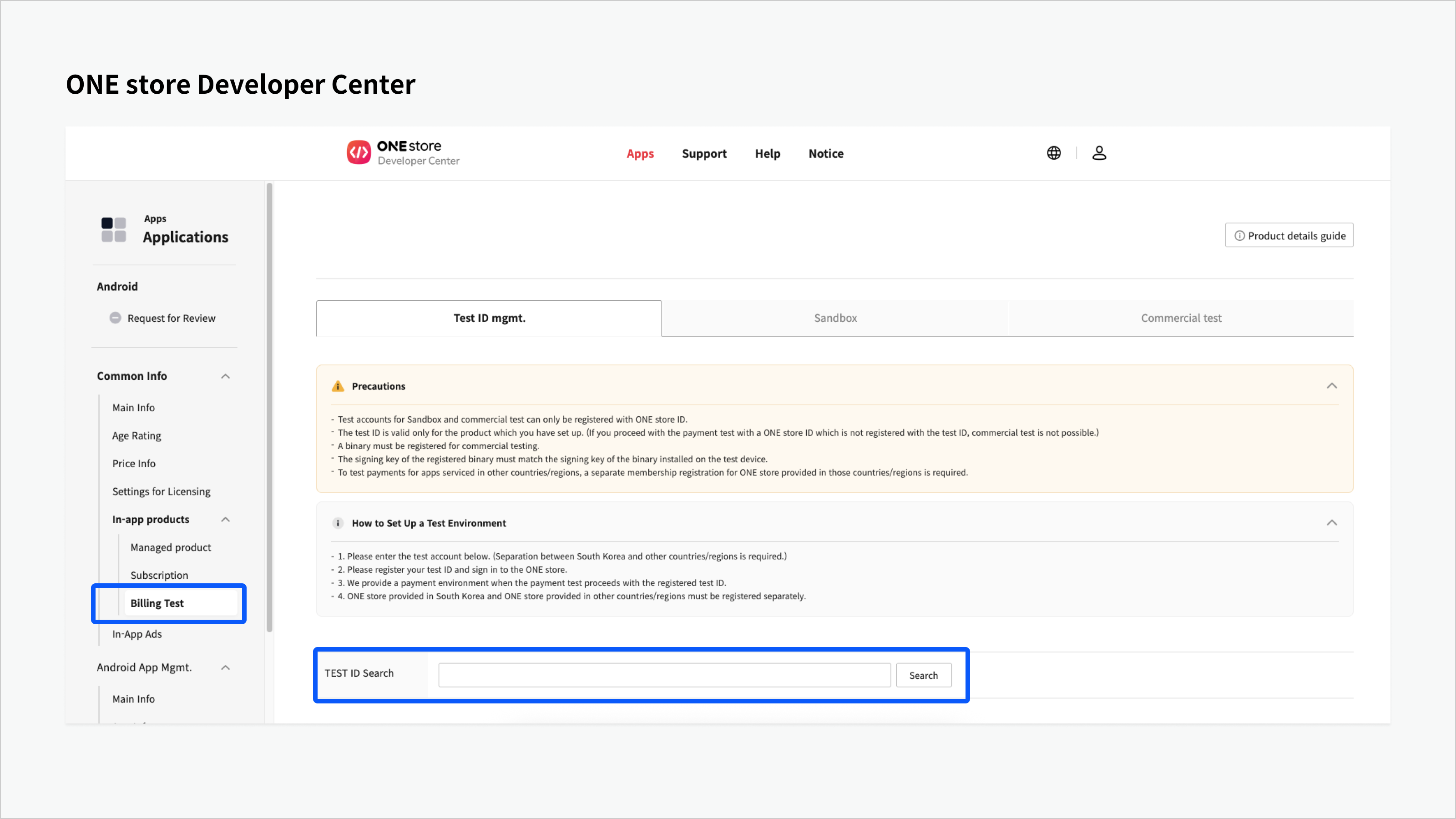
* 在ONE store研发者中心测试App中,以支付测试ID注册ONE store账户。
* 注册时可以选择支付环境。
* Sandbox
* Commercial (商用测试)
* 参考 : [注册测试ID](https://onestore-dev.gitbook.io/dev/chi/tools/billing/v21/test#inapp-zhi-fu-ce-shi-ji-an-quan-xing-zhu-ce-ce-shi-id)
### 3.注册测试ID
* 在ONE store研发者中心测试App中,以支付测试ID注册ONE store账户。
* 注册时可以选择支付环境。
* Sandbox
* Commercial (商用测试)
* 参考 : [注册测试ID](https://onestore-dev.gitbook.io/dev/chi/tools/billing/v21/test#inapp-zhi-fu-ce-shi-ji-an-quan-xing-zhu-ce-ce-shi-id)
 ### 4. App 联动设置
* 设置联动测试的研发者App的 `AndroidManifest.xml`文件。
* 为了指定商店,把研发者选项(`onestore:dev_option`的 `android:value` 值)设置为`onestore_03`。
### 4. App 联动设置
* 设置联动测试的研发者App的 `AndroidManifest.xml`文件。
* 为了指定商店,把研发者选项(`onestore:dev_option`的 `android:value` 值)设置为`onestore_03`。
<manifest>
    <application>
        <meta-data android:name="onestore:dev_option" android:value="onestore_03" />
    </application>
</manifest>
* 参考: [为选择商店设置开发者选项](https://onestore-dev.gitbook.io/dev/chi/tools/billing/v21/sdk#undefined-3)
### 5. 进行支付测试
* 运行研发者App试图支付。
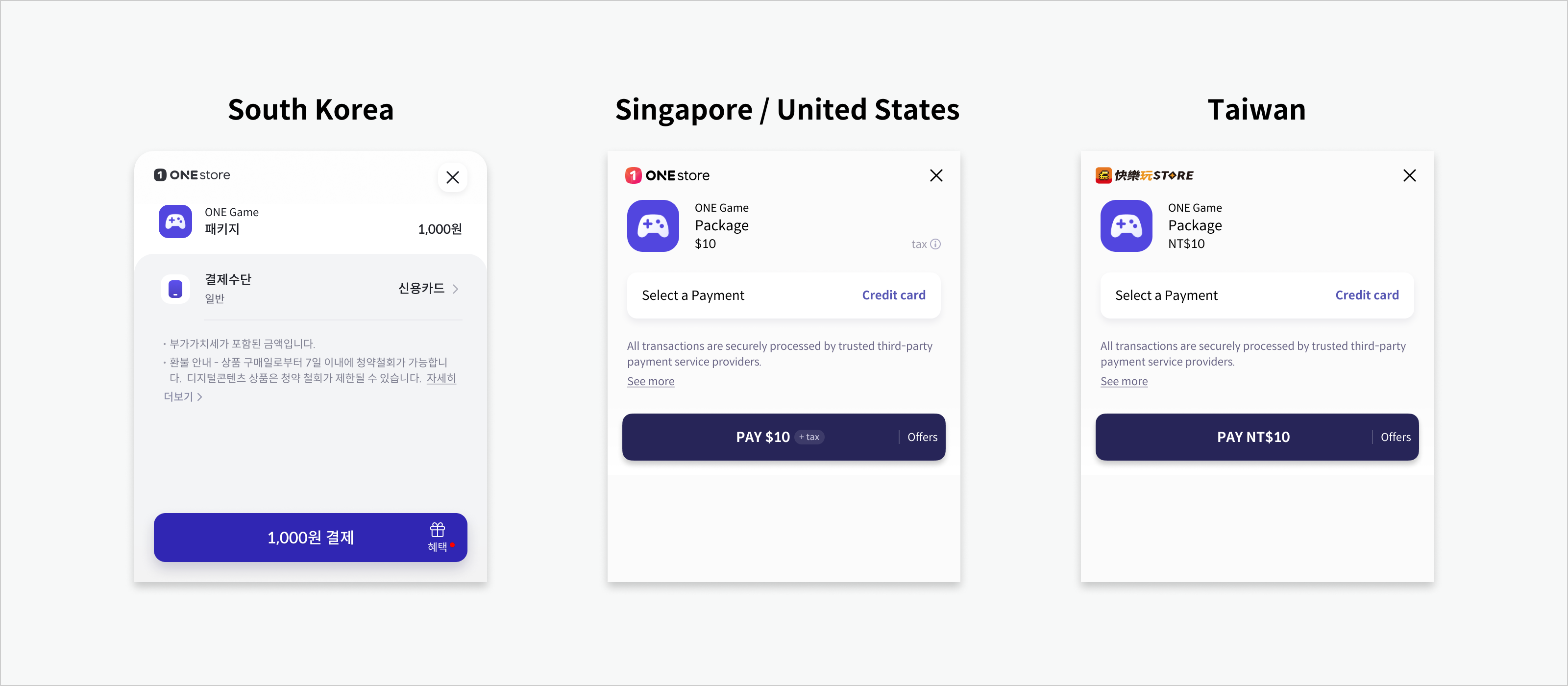
* 按照注册ONE store账户的国家和研发者中心设置的支付环境基准,显示支付画面。
* 例如\
:美国会员 + 商用支付环境 → 显示实际支付画面和支付手段,实际支付功能
 {% hint style="danger" %}
为进行商用测试,必须在 ONE store Developer Center 注册 Binary。
{% endhint %}
| 条件 | 商用测试 (uploadKey) | 商用测试 (store signingKey) | Sandbox 测试 | 备注 |
| ---------- | ---------------- | ----------------------- | ---------- | ------------ |
| 未注册 Binary | ✖ 不可 | ✖ 不可 | ✔ 可行 | 仅可使用 Sandbox |
| 已注册 Binary | ✔ 可行 | ✔ 可行 | ✔ 可行 | 通过签名验证后全部允许 |
### 6. 确认支付记录及取消支付
* 可以在ONE store研发者中心确认支付记录。
* 需要时可以亲自处理取消支付。
{% hint style="danger" %}
为进行商用测试,必须在 ONE store Developer Center 注册 Binary。
{% endhint %}
| 条件 | 商用测试 (uploadKey) | 商用测试 (store signingKey) | Sandbox 测试 | 备注 |
| ---------- | ---------------- | ----------------------- | ---------- | ------------ |
| 未注册 Binary | ✖ 不可 | ✖ 不可 | ✔ 可行 | 仅可使用 Sandbox |
| 已注册 Binary | ✔ 可行 | ✔ 可行 | ✔ 可行 | 通过签名验证后全部允许 |
### 6. 确认支付记录及取消支付
* 可以在ONE store研发者中心确认支付记录。
* 需要时可以亲自处理取消支付。