> For the complete documentation index, see [llms.txt](https://onestore-dev.gitbook.io/dev/llms.txt). Markdown versions of documentation pages are available by appending `.md` to page URLs; this page is available as [Markdown](https://onestore-dev.gitbook.io/dev/chi/webshop/implementation.md).
# Webshop Promotion Guide
## Implementation Guide
### 1. What is ONEshop?
ONEshop is an official web-based storefront service provided by ONE store that enables developers to **sell game items through a web environment**.
* ONEshop is not a replacement for in-app purchases. It is a complementary sales channel that allows developers to extend their commerce experience through their own channels.
* The ONEshop product URL can be linked not only through the developer's own marketing channels but also within the ONE store distribution app, supporting user conversion across various touchpoints.
#### Key Features
* Link integration available through developer marketing channels and the ONE store distribution app
* **Low commission** with PG fees included
* Accessible from any browser on PC, Android, and iOS
* Quick integration using the same server API specification as in-app purchases
* One-stop management of registration, review, settlement, and CS through Developer Center
#### Webshop Detail Page URL
```
https://webshop.onestore.net/title/{PID}
```
Developers can use this URL across their own marketing channels (in-game, official website, community, etc.).
### 2. Correct Placement of IAP Store and Webshop
The webshop entry point can be provided directly within the game app. However, the following principle must be strictly observed.
{% hint style="danger" %}
**Key Principle**
* Displaying webshop navigation paths or products **within the in-app purchase store page** is not allowed.
* The webshop entry point must be configured as a **separate path, functionally independent** from the in-app purchase store.
{% endhint %}
### 3. Correct Navigation When Entering the Webshop
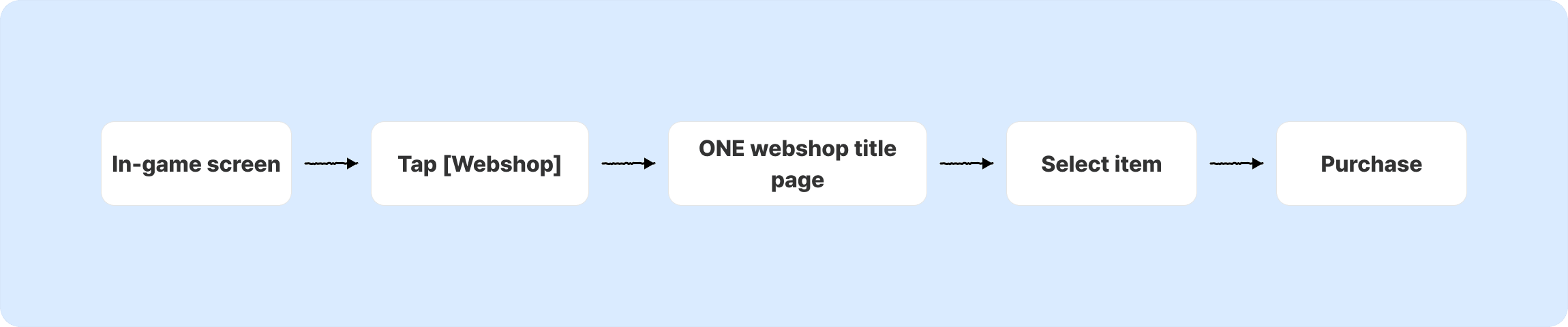
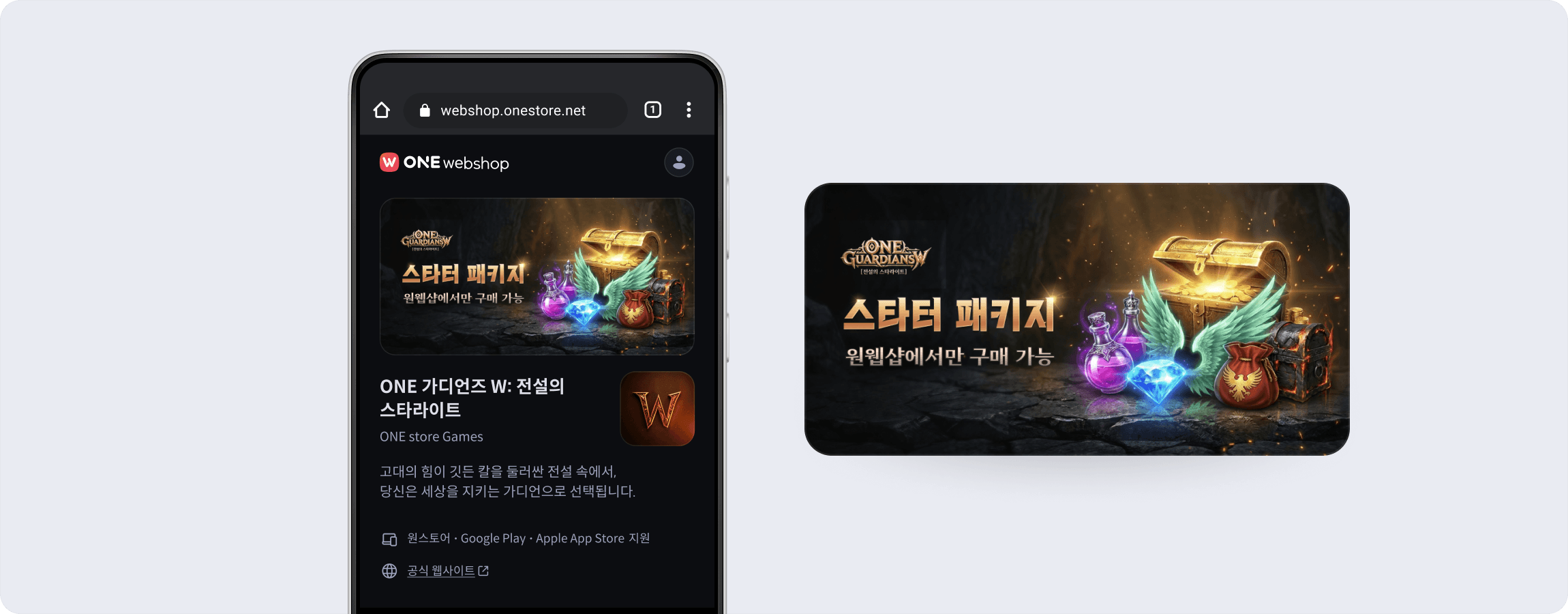
When clicking the webshop button in-game, it must be implemented by calling the ONEshop title detail page.
{% hint style="danger" %}
**Key Principle**
* Directly displaying or listing specific webshop items within the game app is not allowed.
{% endhint %}
#### Allowed Navigation Methods
Outside of the IAP store, the following formats may be freely used:
* Button (e.g., Go to Webshop)
* Text link
* Popup / Dialog
* Menu item
* Banner image, etc.
### 4. UX Optimization Tips
* We recommend providing a brief transition popup before navigating to the webshop (between the Webshop button click and the Webshop detail page).
* ONEshop supports **automatic game ID linking** when navigating from the game to the webshop, allowing users to purchase without manually entering their game ID. For detailed integration instructions, refer to [User Information Integration](broken://pages/EypKAdTiJXLpqs6gwAIn) guide.
{% hint style="danger" %}
**Privacy Notice**
If the game ID constitutes personal information under your privacy policy, you may need to add a **third-party data sharing consent** message. Please review your privacy policy and applicable regulations.
{% endhint %}
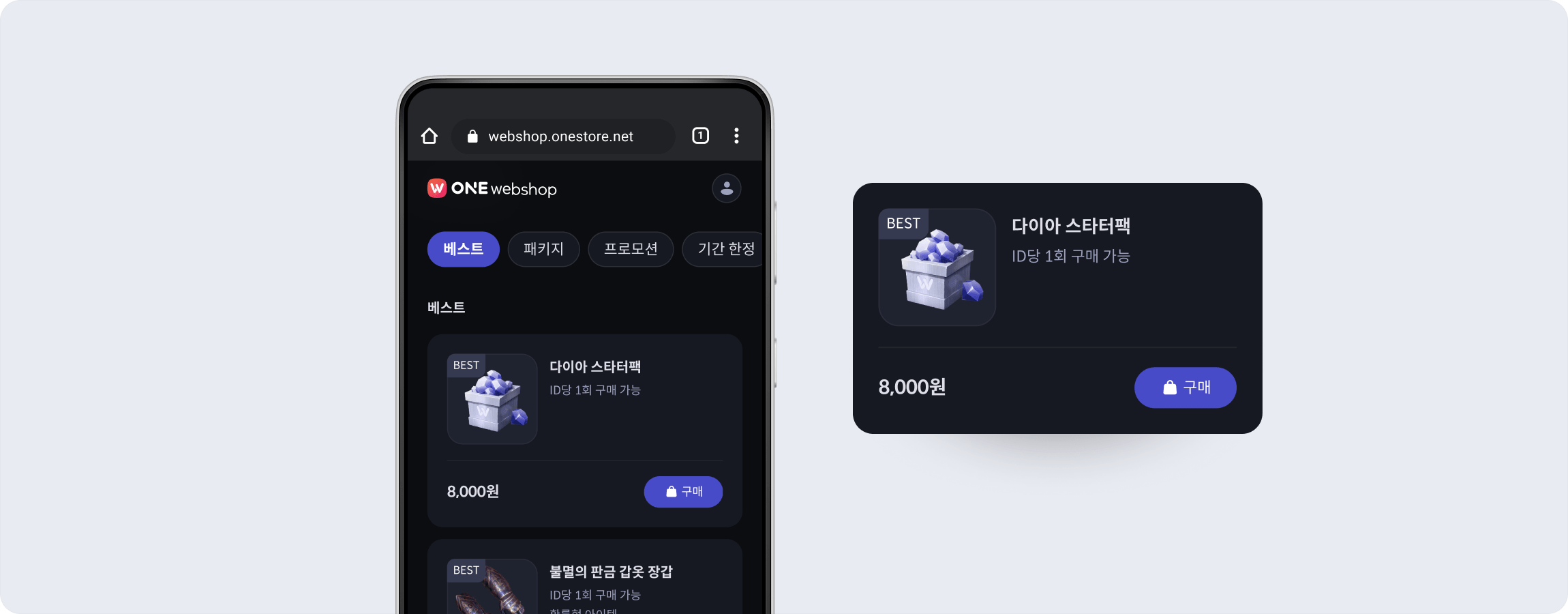
### 5. Utilizing the Webshop Detail Page
This section describes the features available on the ONEshop detail page that developers can leverage.
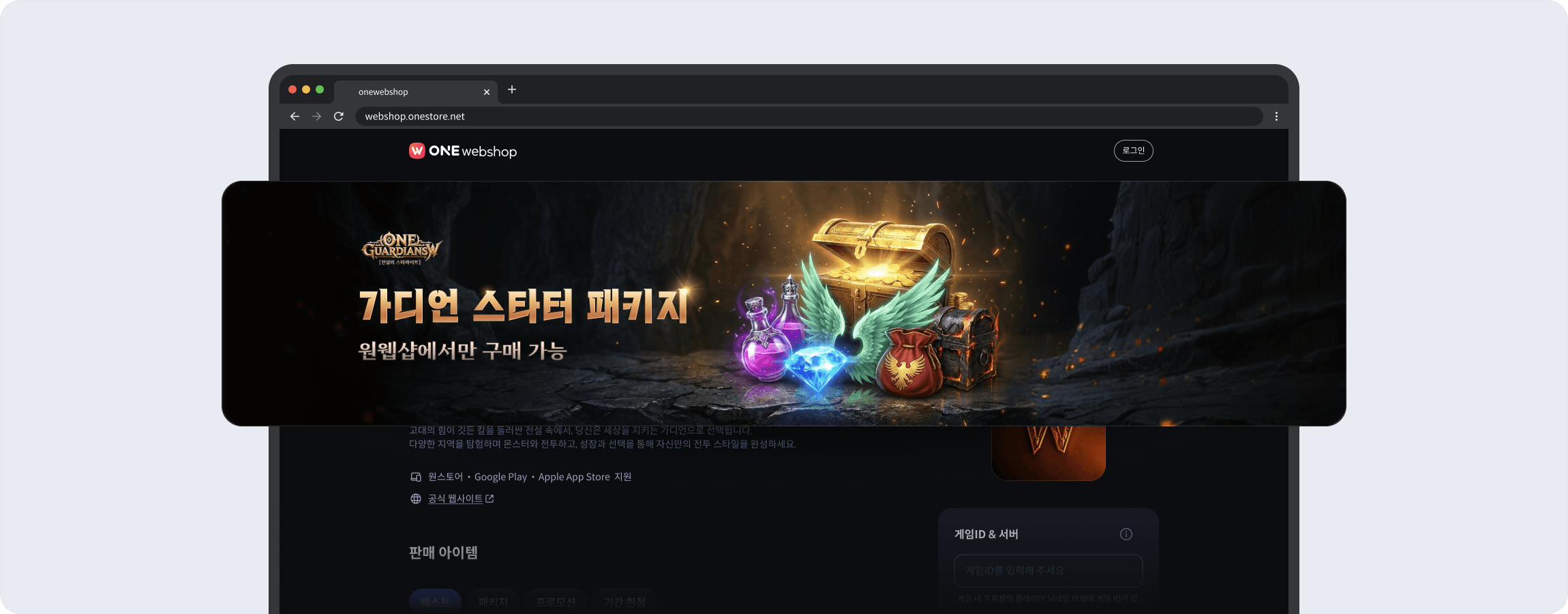
#### 5-1. Top Banner Area
You can register a representative game image or promotional image. Use this area for:
* Featured webshop item announcements
* Promotion / seasonal event banners
* Limited-time sale notices
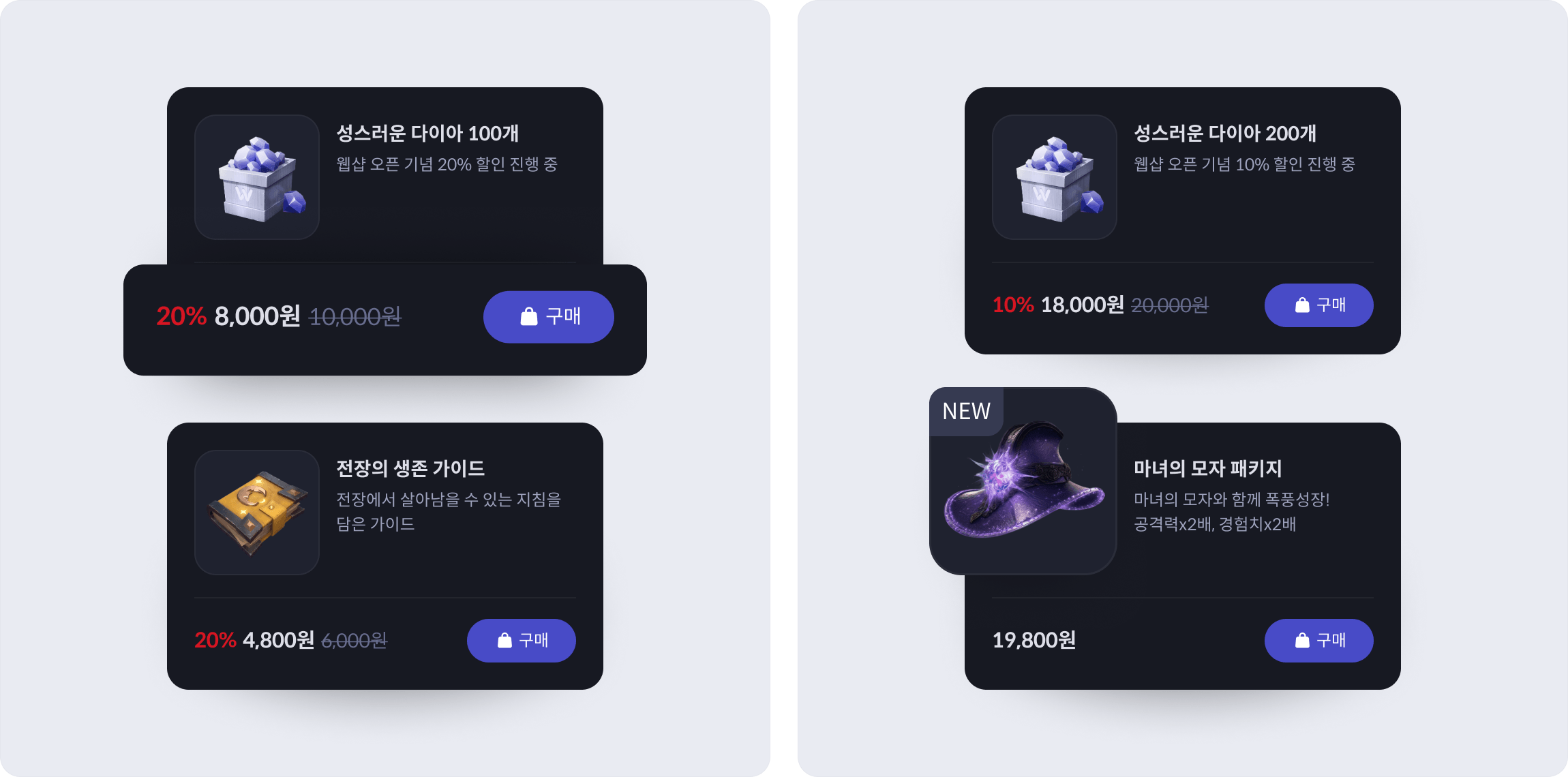
#### 5-2. Item Badges and Discount Pricing
* Add short descriptions to each item to effectively communicate its value to users.
* Highlight featured products with badges.
| Badge Type | Purpose |
| ---------- | ------------------------------------- |
| **New** | Highlight newly registered items |
| **Best** | Highlight popular / recommended items |
* Set both a regular price and a sale price. The regular price will be displayed with a strikethrough, and the discounted price will be highlighted.
```
Example:
Regular price: 12,000 KRW -> Sale price: 9,600 KRW (20% off)
```
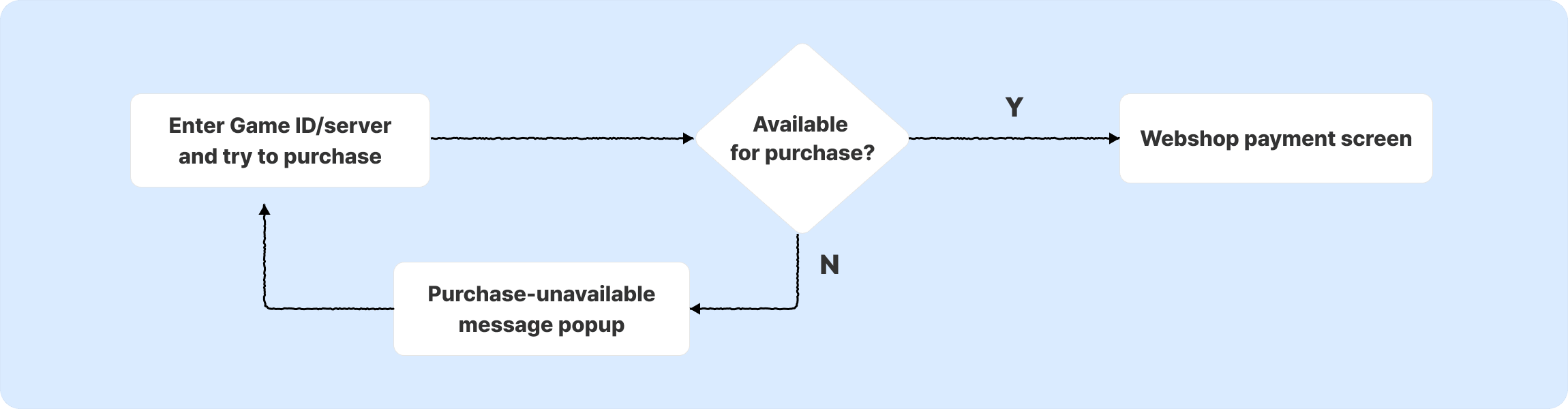
### 6. Handling Purchase Limits
The webshop cannot directly verify in-game purchase eligibility. Instead, developers can handle purchase restrictions through API responses, refer to [User Validation](broken://pages/EXLmyhStUcOzoGSTYXyg) guide.
#### 6-1. Flow
1. User enters their game ID / server and attempts a purchase on the webshop.
2. ONEshop sends a purchase request to the developer server.
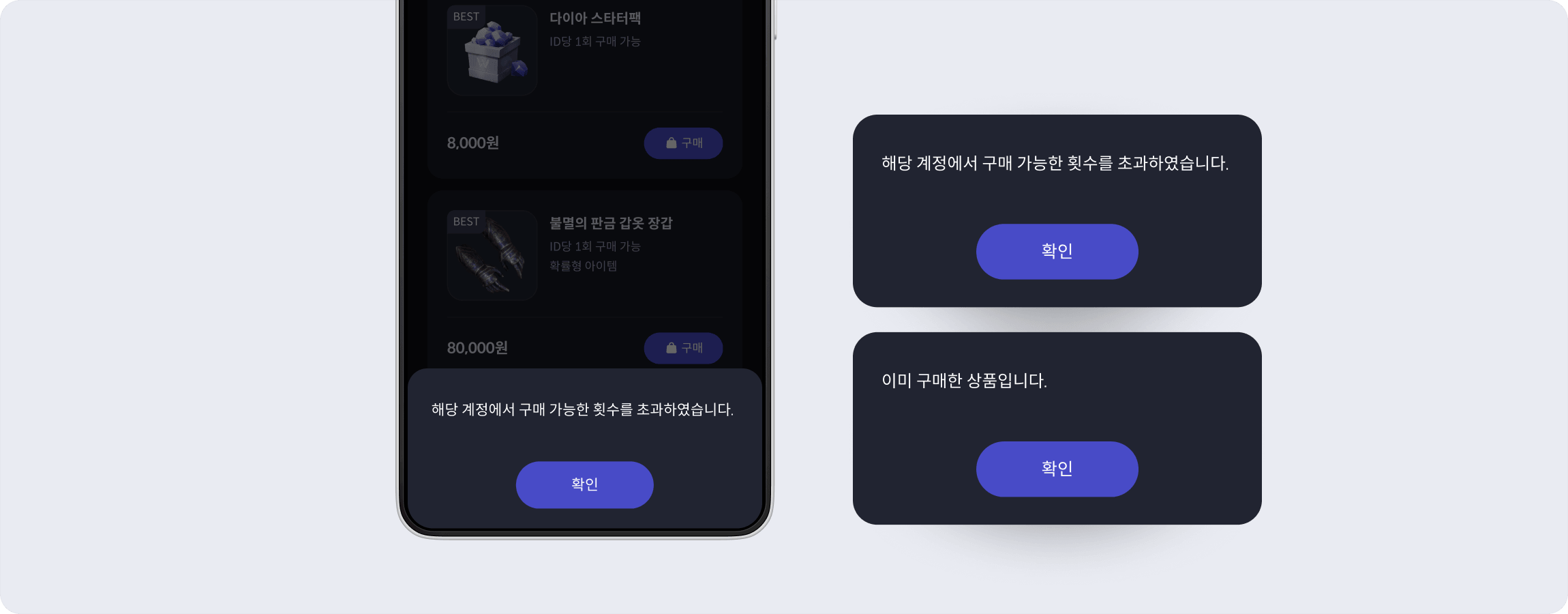
3. If the developer server determines the purchase is not allowed, it returns **status code `1001`** with a display message.
4. ONEshop displays the message to the user.
#### 6-2. API Response Example
```
{
"result.code": "1001",
"result.message": "해당 계정에서 구매 가능한 횟수를 초과하였습니다." //You have exceeded the maximum number of purchases for this account.
}
```
#### 6-3. Recommended Messages
| Scenario | Recommended Message |
| ------------------------------- | ------------------------------------------------------------------------------------------------------------- |
| Purchase limit exceeded |
You have exceeded the maximum number of purchases for this account. ("해당 계정에서 구매 가능한 횟수를 초과하였습니다.")
|
| One-time item already purchased |
This item has already been purchased. ("이미 구매한 상품입니다.")
|
| Event expired | This promotional item is no longer available.("이벤트 기간이 종료된 상품입니다.") |
#### 6-4. Pre-Purchase Notice in Item Description (Recommended)
To reduce confusion before purchase, we recommend stating purchase limits in the item description field.
{% hint style="info" %}
**Examples**
* Limit 1 per account
* Daily purchase limit: 3
* 5 purchases per server per month
{% endhint %}
## External Promotion Guide
* ONEshop performance **varies significantly depending on external promotion efforts.** Since users are unlikely to become aware of the webshop through in-game integration alone, active promotion outside the game is essential.
* This guide covers promotion methods using announcements, banners, and external media.
* In particular, **“Utilizing Announcements” is a mandatory action** for developers who have integrated ONEshop. Official community announcements are the most effective way to inform existing users about the webshop at no additional cost. After integrating ONEshop, be sure to notify users through announcements.
### 1. Utilizing Announcements
Including the following items in your webshop promotion announcements will increase user visits and conversions.
#### 1-1. Content to Include in Announcements
1. **Webshop-exclusive benefits:** Clearly communicate exclusive products or webshop benefits (e.g., items sold only on the webshop, 20% bonus in-game currency, etc.)
2. **Webshop access link:** Provide a direct link in the format `https://webshop.onestore.net/title/{PID}`
3. **(If applicable) ONE store build download guide:** If the game content that provides an in-game path to ONEshop has been uploaded to ONE store, include the game installation link on ONE store as well
#### 1-2. Announcement Placement & Methods
* **Pinned announcement:** **Permanently pin** the ONEshop guide at the top of the community for continuous exposure to both new and existing users
* e.g., \[Pinned] ONEshop Quick Access & Key Benefits
* **Event announcement:** Include webshop benefits **alongside** updates, seasonal events, and new content releases
* e.g., \[Limited Time] ONEshop Exclusive Package Open
* **Embedded in operational content:** Naturally insert webshop links into **routine operational content** such as weekly newsletters, GM messages, and coupon distribution posts for repeated exposure without fatigue
* e.g., Add webshop link at the bottom of weekly updates
#### 1-3. Example Copy by Scenario
1. **Evergreen notice:** *“Explore exclusive products and various bonus rewards on the official ONEshop. For more benefits, please check the link below.”*
2. **Benefit-focused:** *“The ONEshop offers special products with exclusive official channel benefits. Discover the bonus rewards and special bundle items now.”*
3. **Event-linked:** *“To celebrate the update, special bundle items and bonus rewards are available on the ONEshop. Check out the webshop-exclusive benefits below.”*
4. **Urgency/Deadline:** *“The current ONEshop special offer is ending soon. Don’t miss out on the limited-time items and rewards!”*
***
### 2. Utilizing Banners
Placing banners on communities, official websites, and app store listings allows users to access the webshop without additional navigation.
#### 2-1. Materials to Include in Banners
Include the **“Shop on ONEshop” badge** in banners and external ad creatives to communicate to users that ONEshop is an official sales channel.
{% file src="/files/zCvLXxlHtr0mjN9KHgYg" %}
{% file src="/files/OBd0BeWsIvHVElVRWBnn" %}
| Theme | Badge | BI |
| --------------- | --------------------------------------------------------------------------------------------------------------------------------------------------------------------------------------------------------------------------------------------------------- | --------------------------------------------------------------------------------------------------------------------------------------------------------------------------------------------------------------------------------------------------------- |
| **White Theme** | | |
| **Dark Theme** |  | |
#### 2-2. Banner Click Behavior
1. **Direct link to ONEshop:** Link the banner click to the ONEshop URL (`https://webshop.onestore.net/title/{PID}`) for immediate access
2. **Via another page:** If the banner leads to an event page or announcement page, make sure that page includes the **ONEshop access link and instructions**
1. *e.g., “Check out the special packages on the ONEshop via the link below” + Webshop URL*
#### **2-3. Banner Copy & Placement Examples**
| Banner Copy Examples | Banner Placement Examples |
| ----------------------------------------------------------------------------------------------------------------------------------------------------------------------------------------------------------------------------------------------------------------------- | ----------------------------------------------------------------------------------------------------------------------------------------------------------------------------------------------------------------- |
|
Direct access: “Go to ONEshop” / “Visit the Official Webshop”
Benefit-focused: “Check Webshop-Exclusive Benefits” / “View Special Packages”
Event-linked: “\[Update Celebration] ONEshop Special Benefits”
|
Main banner / side banner at the top of the community
External links section of the community
Button area below announcements
Official website / app store listing page
|
***
### 3. Utilizing External Media
Use banners or other prepared creatives to promote the webshop across various SNS and external channels.
#### 3-1. Community Channel Usage
* **Discord:** Pin a webshop link in the #announcement channel; include webshop benefits in update/season announcements; distribute Discord-exclusive coupons to drive webshop visits
* **External communities:** Post webshop launch/benefit announcements under the official CM name; include direct webshop links in posts
* **X(Twitter) / Instagram:** Post webshop launches, special benefits, and limited-time promotions in image/card format; include webshop links
* **YouTube, etc.:** Mention the webshop in content introduction videos; place webshop links or coupon codes in video descriptions
#### 3-2. Ad Performance Measurement
When running external ads, you may need to insert tracking codes (UTM parameters, pixels, etc.) to measure ad performance. Since the Developer Center does not currently provide a feature to directly enter tracking codes on webshop pages, please **contact ONE store separately to set up tracking codes.**
| **How to Request** | Request via email |
| -------------------------- | -------------------------------------------------------------------------------------------------------------------------------------------------- |
| **Contact** | |
| **Information to Include** |
- Game name / PID - Ad platform (Google Ads, Meta Ads, etc.) - Tracking code type (UTM, Pixel, etc.) - Desired implementation date
|
#### 3-3. Community Promotion Case Studies
* **Collection ‘P’ Game** – During events, community managers mention “Webshop Exclusive Box” in announcements; continuously promote web-exclusive bonus coins
* **Card ‘M’ Game** – Major webshop renewal announcements on Discord; emphasizes “WEB EXCLUSIVE” products
* **MOBA ‘C’ Game** – Offers webshop visits & free rewards during community events → followed by ad campaigns
* **RPG ‘G’ Game** – Promotes webshop-exclusive events and store information through the game’s account on external communities



 |
|  |
| **Dark Theme** |  |
|
| **Dark Theme** |  |  |
#### 2-2. Banner Click Behavior
1. **Direct link to ONEshop:** Link the banner click to the ONEshop URL (`https://webshop.onestore.net/title/{PID}`) for immediate access
2. **Via another page:** If the banner leads to an event page or announcement page, make sure that page includes the **ONEshop access link and instructions**
1. *e.g., “Check out the special packages on the ONEshop via the link below” + Webshop URL*
#### **2-3. Banner Copy & Placement Examples**
| Banner Copy Examples | Banner Placement Examples |
| ----------------------------------------------------------------------------------------------------------------------------------------------------------------------------------------------------------------------------------------------------------------------- | ----------------------------------------------------------------------------------------------------------------------------------------------------------------------------------------------------------------- |
|
|
#### 2-2. Banner Click Behavior
1. **Direct link to ONEshop:** Link the banner click to the ONEshop URL (`https://webshop.onestore.net/title/{PID}`) for immediate access
2. **Via another page:** If the banner leads to an event page or announcement page, make sure that page includes the **ONEshop access link and instructions**
1. *e.g., “Check out the special packages on the ONEshop via the link below” + Webshop URL*
#### **2-3. Banner Copy & Placement Examples**
| Banner Copy Examples | Banner Placement Examples |
| ----------------------------------------------------------------------------------------------------------------------------------------------------------------------------------------------------------------------------------------------------------------------- | ----------------------------------------------------------------------------------------------------------------------------------------------------------------------------------------------------------------- |
|