# 於Unity 中升級至 ALC SDK V2

## 為進行V1 → V2 轉換，更新Library檔案 <a href="#id-zai-unity-zhong-sheng-ji-dao-alcsdkv2-wei-v1v2-zhuan-huan-geng-xin-library-wen-jian" id="id-zai-unity-zhong-sheng-ji-dao-alcsdkv2-wei-v1v2-zhuan-huan-geng-xin-library-wen-jian"></a>

### 删除V1中使用的Library檔案 <a href="#id-zai-unity-zhong-sheng-ji-dao-alcsdkv2-shan-chu-v1-zhong-shi-yong-de-library-wen-jian" id="id-zai-unity-zhong-sheng-ji-dao-alcsdkv2-shan-chu-v1-zhong-shi-yong-de-library-wen-jian"></a>

| Assets > Plugins > Android | <ul><li>sdk-alc-v1.0.0.aar</li><li>alc-android-library-v1.0.0.aar</li></ul> |
| -------------------------- | --------------------------------------------------------------------------- |
| Assets > StreamingAssets   | <ul><li>global-appstores.json</li></ul>                                     |

### 為使用V2 ，新增所需的Library <a href="#id-zai-unity-zhong-sheng-ji-dao-alcsdkv2-wei-shi-yong-v2-tian-jia-suo-xu-de-library" id="id-zai-unity-zhong-sheng-ji-dao-alcsdkv2-wei-shi-yong-v2-tian-jia-suo-xu-de-library"></a>

| Assets > Plugins > Android | <ul><li>sdk-alc-v2.0.0.aar</li><li>sdk-auth-v1.0.2.aar</li><li>sdk-base-v1.0.3.aar</li><li>sdk-configuration-v1.0.0.aar</li><li>alc\_adapter-v1.1.0.aar</li></ul> |
| -------------------------- | ----------------------------------------------------------------------------------------------------------------------------------------------------------------- |

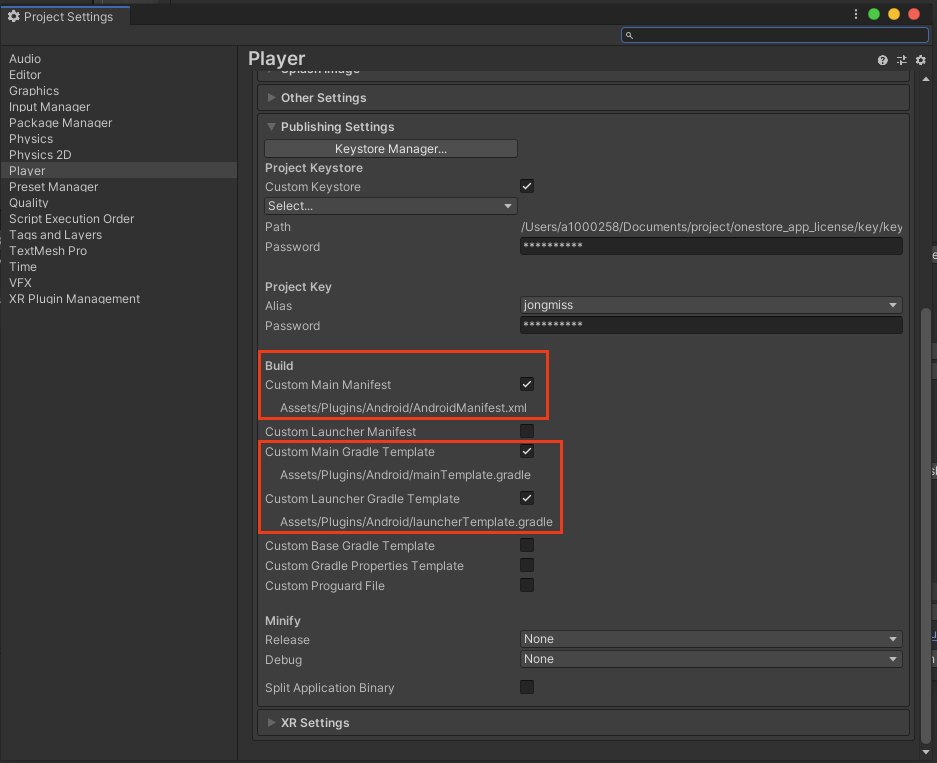
### Unity 中，新增 Project Settings > Publishing Settings 的 Custome Build 環境。 <a href="#id-zai-unity-zhong-sheng-ji-dao-alcsdkv2unity-zhong-tian-jia-projectsettingspublishingsettings-de-cu" id="id-zai-unity-zhong-sheng-ji-dao-alcsdkv2unity-zhong-tian-jia-projectsettingspublishingsettings-de-cu"></a>

為登入、更新、安裝模板，需要新增以下内容。

新增項目

* Custom Main Manifest
* Custom Main Gradle Template
* Custom Launcher Gradle Template<br>

  <figure><img src="/files/jzGtt5wbaKeQx61UPrDY" alt=""><figcaption></figcaption></figure>

### AndroidManifest.xml中新增 \<queries> <a href="#id-zai-unity-zhong-sheng-ji-dao-alcsdkv2androidmanifest.xml-zhong-tian-jia-queries" id="id-zai-unity-zhong-sheng-ji-dao-alcsdkv2androidmanifest.xml-zhong-tian-jia-queries"></a>

以下兩種情况，請參考ONE store 公告並進行設定&#x20;

* [Target SDK 版本設定為30(OS 11) 以上](https://dev.onestore.co.kr/devpoc/support/news/noticeView.omp?pageNo=4\&noticeId=32968\&viewPageNo=\&searchValue=)
* [Target SDK 版本設定為31(OS 12) 以上](https://dev.onestore.co.kr/devpoc/support/news/noticeView.omp?pageNo=1\&noticeId=33072\&viewPageNo=\&searchValue=)

Assets > Plugins > Android > AndroidManifest.xml

需要新增以下queries。


---

# Agent Instructions: Querying This Documentation

If you need additional information that is not directly available in this page, you can query the documentation dynamically by asking a question.

Perform an HTTP GET request on the current page URL with the `ask` query parameter:

```
GET https://onestore-dev.gitbook.io/dev/cht/tools/alc/wu-unity-zhong-sheng-ji-zhi-alc-sdk-v2.md?ask=<question>
```

The question should be specific, self-contained, and written in natural language.
The response will contain a direct answer to the question and relevant excerpts and sources from the documentation.

Use this mechanism when the answer is not explicitly present in the current page, you need clarification or additional context, or you want to retrieve related documentation sections.