# Billing\_3rd party

### **What is 3rd Party Payment?** <a href="#billing_3rdparty-whatis3rdpartypayment" id="billing_3rdparty-whatis3rdpartypayment"></a>

The 3rd party payment is a payment service provided by the seller (hereafter called the “developer”) through direct interworking with Payment Gateway (PG) without the application of ONE store’s in-app payment module (in-app SDK).

### **How to Apply 3rd Party Payment** <a href="#billing_3rdparty-howtoapply3rdpartypayment" id="billing_3rdparty-howtoapply3rdpartypayment"></a>

* #### **Transfer Transaction History** <a href="#billing_3rdparty-transfertransactionhistory" id="billing_3rdparty-transfertransactionhistory"></a>
  * When 3rd party payment is used, the transaction history of the 3rd party payment (purchase history, cancellation history) must be transferred to ONE store and the development and review of this 3rd party payment service is needed.
  * The transaction history delivered to ONE store will be utilized for ONE store’s ranking and service and as data for settlement between ONE store and the developer.\ <br>
* #### **Development & Review Process** <a href="#billing_3rdparty-development-and-reviewprocess" id="billing_3rdparty-development-and-reviewprocess"></a>

<figure><img src="https://2218522982-files.gitbook.io/~/files/v0/b/gitbook-x-prod.appspot.com/o/spaces%2FgStyyzRzNh9x2u93ZH03%2Fuploads%2FQDCTg3Pka3hvqVI9IubV%2Fimage.png?alt=media&#x26;token=2a18241e-062c-43af-ad96-a3558a38407e" alt=""><figcaption></figcaption></figure>

* * (A) \[Developer] Register new app through ONE store Developer Center > Apps > 'Product Registration' button.
    * On the product registration screen, set the '3rd Party Payment method' option to 'Use'.<br>

      <figure><img src="https://2218522982-files.gitbook.io/~/files/v0/b/gitbook-x-prod.appspot.com/o/spaces%2FgStyyzRzNh9x2u93ZH03%2Fuploads%2F78kpfFA6Yw6CdoE0CxUA%2Fimage.png?alt=media&#x26;token=a357b606-11cd-46c1-bd11-0cc8526b8883" alt=""><figcaption></figcaption></figure>
    * In the 'Agreement to use 3rd Party payment method' pop-up, you have to agree to click 'confirm'.<br>

      <figure><img src="https://2218522982-files.gitbook.io/~/files/v0/b/gitbook-x-prod.appspot.com/o/spaces%2FgStyyzRzNh9x2u93ZH03%2Fuploads%2FMjOk10uGIPQ0LaZ84ndh%2Fimage.png?alt=media&#x26;token=40dd36e2-a048-4bb3-8bed-ef9d2b4c58cc" alt=""><figcaption></figcaption></figure>
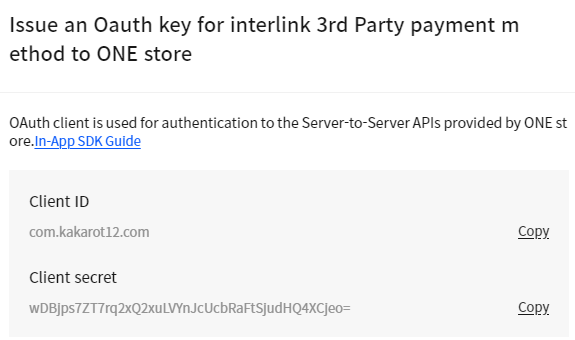
* * (B) \[Developer] You can get OAuth Key (Client secret) issued on the product registration screen.<br>

    <figure><img src="https://2218522982-files.gitbook.io/~/files/v0/b/gitbook-x-prod.appspot.com/o/spaces%2FgStyyzRzNh9x2u93ZH03%2Fuploads%2FP9af4oAIybjIhzyhVeSA%2Fimage.png?alt=media&#x26;token=ff25899d-1db2-4014-9353-9aa9d52fe670" alt=""><figcaption></figcaption></figure>
* * (C) \[Developer] Development shall be made with reference to Server API Specification.
    * Issuance of an OAuth Access Token and the transmission of the transaction history, etc. shall be developed.
  * (D) \[Developer] The developer is required to confirm that the transaction history has been normally transmitted in the Sandbox environment ([https://sbpp.onestore.co.kr](https://sbpp.onestore.co.kr/)).
  * (E) \[Developer] To be reviewed by ONE store, the final APK shall be uploaded on ONE store Developer Center and shall interwork with the commercial environment.
    * The commercial environment of the developer must interwork with that (<https://apis.onestore.co.kr)of> ONE store, and
    * the 3rd party payment gateway company interworking with the developer must interwork with the commercial environment of ONE store.
  * (F) \[Developer] A review request shall be made.
  * (G) \[ONE store] ONE store is required to make payment in the developer’s app and confirm the transaction history has been normally sent to the commercial environment.
  * (H) \[ONE store] ONE store shall request the developer to cancel the 3rd party payment used for review (by sending a request email to the developer’s person in charge).
  * (I) \[Developer] The developer shall process the requested cancellation of the transactions used for review.
  * (J) \[ONE store] ONE store shall confirm that the history of the cancelled transactions has been sent to the commercial environment, and then complete the review process.
  * (K) \[Developer] The developer can process to start the sales of the app for which review has been completed.\ <br>
* #### **Criteria for Transmitting Transaction History** <a href="#billing_3rdparty-criteriafortransmittingtransactionhistory" id="billing_3rdparty-criteriafortransmittingtransactionhistory"></a>
  * The criteria for transmitting the transaction history is as follows:
    * 3rd party payment occurs,
    * when items are directly purchased by using 3rd party payment methods.
    * when the in-app goods\* are recharged by using 3rd party payment methods.\
      (\*the in-app goods : goods that can be charged only within the app and items can be purchased with this goods only at that app)
    * when items are purchased by using the developer’s own payment methods\*\*.\
      (\*\*the developer’s own payment methods : payment methods that can be purchased by using 3rd party payment methods through other channels such as other apps or web of the same developer and used by multiple apps of the developer)
    * Exceptional cases occur (3rd party payment does not take place),
    * when items are purchased by using the developer’s own promotional payment methods (free coupon, point cash, etc.)
* * Transaction history is confirmed based on Purchase ID(developerOrderId).
    * The app using 3rd party payment options is required to offer purchase ID to the user ‘when the 3rd party payment is completed’. (in the payment completion screen and in the email notice)
    * ONE store’s review team shall confirm that the transaction history has been normally sent to ONE store on a basis of the purchase ID when the 3rd party payment /cancellation is made for this app.
  * If the payment method you use is foreign exchange or encryption money, please note the following:
    * The transaction amount on the '3rd party payment developer guide' shall be transferred in Korean won at the same date. (Google search, based on 00 o'clock on the day)
    * Once confirmed by the ONE store's review team, if the correct transaction amount is not delivered, the validation rejects or sales suspension may be processed.

### **Server API** <a href="#billing_3rdparty-serverapi" id="billing_3rdparty-serverapi"></a>

* #### **What is 3rd Party Payment Server API?** <a href="#billing_3rdparty-whatis3rdpartypaymentserverapi" id="billing_3rdparty-whatis3rdpartypaymentserverapi"></a>
  * When the payment is completed (successful), the developer needs to have a process to send the relevant data to ONE store and synchronize the payment history.\
    In addition, when a change (a cancellation) occurs after the payment and synchronization is completed, it is also required to transmit the history.\
    The purchase/cancellation history of the 3rd party payment that has been transmitted to ONE store will be reflected on ONE store ranking and exposed to general customers and used as data for the settlement with the developer.
  * 3rd party payment server API is an API, which is provided to transfer to ONE store the purchase/cancellation history of the 3rd party payment incurred to the developer.
    * send3rdPartyPurchase (transmits the purchase history of the 3rd party payment)
    * cancel3rdPartyPurchase (cancels the purchase history of the 3rd party payment)
  * OAuth authentication is required first for the interworking of each API, and for the OAuth authentication, client\_id and client\_secret should be issued in advance.\ <br>
* #### **Interworking Environment** <a href="#billing_3rdparty-interworkingenvironment" id="billing_3rdparty-interworkingenvironment"></a>
  * ONE store API server is provided separately for Sandbox (the development environment) and the commercial environment according to its purpose.
    * Sandbox &#x20;
    * is a virtual interworking environment to which commercial API standards have been applied as they are.
    * can be used for development review before launching the app on Developer Center once the development for interworking between ONE store and server API has been completed.
    * The payment data transferred from the developer will not be used for ranking or settlement.
    * The commercial environment
    * is a real service interworking environment where the payment history needs to be synchronized for completion or cancellation of the customer’s payment.
    * The data transferred to the commercial environment will be reflected on settlement. If a payment test is performed in the commercial environment, the payment MUST be cancelled.
    * Host information of Sandbox and the commercial environment is as follows.

      | Environment | Service Host                                                |
      | ----------- | ----------------------------------------------------------- |
      | Sandbox     | [https://sbpp.onestore.co.kr](https://sbpp.onestore.co.kr/) |
      | Commercial  | <https://apis.onestore.co.kr>                               |
* #### **Transmit Purchase History of 3rd Party PaymentInterworking Flow** <a href="#billing_3rdparty-transmitpurchasehistoryof3rdpartypaymentinterworkingflow" id="billing_3rdparty-transmitpurchasehistoryof3rdpartypaymentinterworkingflow"></a>
  * If the user requests a product purchase in an app, the app obtains information necessary for interworking (refer to 4. Reference Code)
  * The purchase request of the user along with the information acquired from the app is sent to the developer’s server.
  * Payment will be processed through 3rd party payment (PG company or in-app payment of other markets) in the developer’s server. The result will be sent to the app.
  * Simultaneously, the purchase history of the 3rd party payment will be transferred to ONE store API Server.
    * (In case ONE store OAuth Access Token expires,) it is required to get an OAuth Access Token issued and then perform API interworking.
    * It is recommended to save the result of the API interworking as a status value. If the interworking is in the failure status, perform retry.

<figure><img src="https://2218522982-files.gitbook.io/~/files/v0/b/gitbook-x-prod.appspot.com/o/spaces%2FgStyyzRzNh9x2u93ZH03%2Fuploads%2FhL4JFrjSgbixO3pnPFzs%2Fimage.png?alt=media&#x26;token=16ff2624-9e21-4bd9-b2b3-4868429a550a" alt=""><figcaption></figcaption></figure>

* * Obtain Client Information
    * App installation market information
    * Mobile carrier information
  * Make Payment Request
  * Process 3rd Party Payment
  * Complete Payment
  * \[When the OAuth Token expires] Issue an OAuth Token
  * Send Purchase History of 3rd Party Payment\ <br>
* #### **Cancel Purchase History of 3rd Party Payment** <a href="#billing_3rdparty-cancelpurchasehistoryof3rdpartypayment" id="billing_3rdparty-cancelpurchasehistoryof3rdpartypayment"></a>
  * When the purchase history interworked to ONE store is cancelled, this cancellation history of the 3rd party payment will be transferred to ONE store API Server.
  * (In case ONE store’s OAuth Access Token expires,) it is required to get an OAuth Access Token issued and then perform API interworking.
  * It is recommended to save the result of the API interworking as a status value. If the interworking is in the failure status, perform retry.

<figure><img src="https://dev.onestore.co.kr/wiki/en/doc/files/1671206/4948196/1/1593180588000/5.png" alt=""><figcaption></figcaption></figure>

* #### **Caution** <a href="#billing_3rdparty-caution" id="billing_3rdparty-caution"></a>
  * At the time when the payment is completed or cancelled, the developer is required to transfer the relevant data to ONE store on real time.

    However, development is recommended to prevent the failed payment of items even if the transfer of the data to ONE store fails.
  * The developer is required to implement retransmission just in case when the data transfer fails due to errors in the network, etc.\
    Ex) The data on the transfer failure is periodically re-transmitted by using the batch process

### **ONE store OAuth** <a href="#billing_3rdparty-onestoreoauth" id="billing_3rdparty-onestoreoauth"></a>

#### **Overview** <a href="#billing_3rdparty-overview" id="billing_3rdparty-overview"></a>

* For the interworking with Server API related to the transmission of the transaction history of ONE store, it is required to issue an Access Token through OAuth authentication.
* The Access Token will be valid for 3,600 seconds. When the token expiration time expires or is less than 600 seconds, a new token can be issued by calling getAccessToken().
  * Existing Access Tokens can be used until the end of their expiration
  * Since numerous Access Tokens are issued, different Access Tokens can be obtained and used depending on the developer’s each service instance.
* The general interworking flow is as follows:

<figure><img src="https://2218522982-files.gitbook.io/~/files/v0/b/gitbook-x-prod.appspot.com/o/spaces%2FgStyyzRzNh9x2u93ZH03%2Fuploads%2F121sIoRJzUJTfseklMzS%2Fimage.png?alt=media&#x26;token=82f22525-9f6e-4481-99b6-9596b6410f11" alt=""><figcaption></figcaption></figure>

* The process to get an Access Token (no.1) shall be called when an authentication error occurs at the call of API.
* To call ONE store Server API, the Authorization Bearer scheme shall be used. A sample of the call is as follows.\
  &#x20;(Bearer value is the value of Access Token, which has been issued by calling getAccessToken() )

  | `POST /v2/purchase/developer/com.onestore.game.goindol/send HTTP/1.1Host: apis.onestore.co.krAuthorization: Bearer 680b3621-1234-1234-1234-8adfaef561b4...` |
  | ----------------------------------------------------------------------------------------------------------------------------------------------------------- |
* #### **getAccessToken (issues an accessToken)**  <a href="#billing_3rdparty-getaccesstoken-issuesanaccesstoken" id="billing_3rdparty-getaccesstoken-issuesanaccesstoken"></a>
  * **Desc**: Issue an Access Toke to use Server API.
  * **URI**: https\://{host}/v2/oauth/token
  * **Method**: POST, PUT
  * **Request Header**

    | Parameter Name | Description                                                                              | Example                                         |
    | -------------- | ---------------------------------------------------------------------------------------- | ----------------------------------------------- |
    | Content-Type   | When requesting Http, the Content Type must be set to application/x-www-form-urlencoded. | Content-Type: application/x-www-form-urlencoded |

    <br>

    **Request Body**

    | Element Name   | Description                                                                         | Example                                      |
    | -------------- | ----------------------------------------------------------------------------------- | -------------------------------------------- |
    | client\_id     | In general, it is the same as the packageName                                       | com.onestore.game.goindol                    |
    | client\_secret | The client secret value, which has been issued at the time of the app registration. | vxIMAGcVz3DAx20uDBr/IDWNJAPNHFl7YruF4uxB6BI= |
    | grant\_type    | Fixed value                                                                         | client\_credentials                          |

    \
    Example

    | `POST /v2/oauth/token HTTP/1.1Host: apis.onestore.comContent-Type: application/x-www-form-urlencoded;charset=UTF-8` `grant_type=client_credentials&client_id=com.onestore.game.goindol&client _secret=vxIMAGcVz3DAx20uDBr/IDWNJAPNHFl7YruF4uxB6BI=` |
    | --------------------------------------------------------------------------------------------------------------------------------------------------------------------------------------------------------------------------------------------------- |

    \
    **Response Body**

    | Element Name  | Data Type | Data Size | Description                                    |
    | ------------- | --------- | --------- | ---------------------------------------------- |
    | status        | String    | 7         | The result of issuing an Access Token          |
    | client\_id    | String    | 255       | The OAuth authentication client\_id            |
    | access\_token | String    | 36        | <p><br></p>                                    |
    | token\_type   | String    | 6         | Only the Bearer method is provided.            |
    | expires\_in   | Integer   | 10        | The token expiration time. The unit is second. |
    | scope         | String    | 1024      | The token use range                            |

    \
    Example

    | `{    "status":"SUCCESS",    "client_id":"com.onestore.game.goindol",    "access_token":"680b3621-1234-1234-1234-8adfaef561b4",    "token_type":"bearer",    "expires_in":3010,    "scope":"DEFAULT"}` |
    | ------------------------------------------------------------------------------------------------------------------------------------------------------------------------------------------------------ |

    \
    Example

    | `Request.setHeader("Authorization", " Bearer <Access-Token>");Request.setHeader("Content-Type", "application/json");` |
    | --------------------------------------------------------------------------------------------------------------------- |

### **Server API details** <a href="#billing_3rdparty-serverapidetails" id="billing_3rdparty-serverapidetails"></a>

* It is the detailed specification for transmitting to ONE store server the purchase/cancellation history of the 3rd party payment.
  * #### send3rdPartyPurchase (transfers the purchase history of the 3rd party payment) <a href="#billing_3rdparty-send3rdpartypurchase-transfersthepurchasehistoryofthe3rdpartypayment" id="billing_3rdparty-send3rdpartypurchase-transfersthepurchasehistoryofthe3rdpartypayment"></a>
* * * **Desc**: The developer transfers the history of the purchase made by using the 3rd party payment method.
    * **URI**: https\://{host}/v2/purchase/developer/{packageName}/send
    * **Method**: POST
    * **Parameter**: String packageName : The package name of an app, which calls API (Data Size: 128).
    * **Request Header**

      | Parameter Name | Data Type | Required | Description                                           |
      | -------------- | --------- | -------- | ----------------------------------------------------- |
      | Authorization  | String    | TRUE     | The access\_token issued through the Access Token API |
      | Content-Type   | String    | TRUE     | application/json                                      |

      \
      **Request Body**

      | Element Name                     | Data Type   | Data Size   | Required | Description                                                                                                                                                                   |
      | -------------------------------- | ----------- | ----------- | -------- | ----------------------------------------------------------------------------------------------------------------------------------------------------------------------------- |
      | adId                             | String      | 50          | TRUE     | The ADID obtained from the terminal (if there is no ADID, it will be transferred to UNKNOWN\_ADID).                                                                           |
      | developerOrderId                 | String      | 100         | TRUE     | <p>The developer’s purchase ID to identify each purchase case</p><p>(It must be a unique value and error occurs if any duplicate IDs are saved. Refer to Error Response).</p> |
      | developerProductList             | <p><br></p> | <p><br></p> | TRUE     | <p><br></p>                                                                                                                                                                   |
      | developerProductId               | String      | 150         | TRUE     | The developer’s in-app product ID                                                                                                                                             |
      | developerProductName             | String      | 200         | TRUE     | The developer’s in-app product name                                                                                                                                           |
      | <p><br>developerProductPrice</p> | Integer     | 10          | TRUE     | The developer’s in-app product price                                                                                                                                          |
      | <p><br>developerProductQty</p>   | Integer     | 10          | TRUE     | The developer’s in-app product purchase quantity                                                                                                                              |
      | simOperator                      | String      | 20          | TRUE     | <p>The simOperator information obtained from the terminal</p><p>(if there is no simOperator information, it will be transferred to UNKNOWN\_SIM\_OPERATOR).</p>               |
      | installerPackageName             | String      | 150         | TRUE     | <p>The installerPackageName information obtained from the terminal</p><p>(if there is no installerPackageName information, it will be transferred to UNKNOWN\_INSTALLER)</p>  |
      | purchaseMethodList               | <p><br></p> | <p><br></p> | TRUE     | <p><br></p>                                                                                                                                                                   |
      | purchaseMethodCd                 | String      | 30          | TRUE     | The payment method code (refer to Code Table)                                                                                                                                 |
      | purchasePrice                    | Integer     | 10          | TRUE     | The amount of payment by each payment method                                                                                                                                  |
      | totalPrice                       | Integer     | 10          | TRUE     | The total amount of payment                                                                                                                                                   |
      | purchaseTime                     | Long        | 19          | TRUE     | <p>This is the time when the purchase was made since January 1, 1970. (unit : ms)<br>(9002 error if invalid time is sent. Refer to Error Response.)</p>                       |

      Example

      | `{    "adId": "abcdefgh-abcd-1234-abcd-abcdefgh1234",    "developerOrderId"` `: "your_order_id_1234567890",    "developerProductList"` `: [       {"developerProductId"` `: "your_product_id_1111",       "developerProductName"` `: "A",       "developerProductPrice"` `: 5000,       "developerProductQty"` `: 2       },       {"developerProductId"` `: "your_product_id_2222",       "developerProductName"` `: "B",       "developerProductPrice"` `: 5000,       "developerProductQty"` `: 1       }    ],    "simOperator"` `: "45005",    "installerPackageName"` `: "com.skt.skaf.A000Z00040",    "purchaseMethodList"` `: [       {"purchaseMethodCd"` `: "TRD_CREDITCARD",       "purchasePrice"` `: 10000       },       {"purchaseMethodCd"` `: "TRD_PAYCO",       "purchasePrice"` `: 5000       }    ],    "totalPrice"` `: 15000,    "purchaseTime"` `: 1345678920000}` |
      | ----------------------------------------------------------------------------------------------------------------------------------------------------------------------------------------------------------------------------------------------------------------------------------------------------------------------------------------------------------------------------------------------------------------------------------------------------------------------------------------------------------------------------------------------------------------------------------------------------------------------------------------------------------------------------------------------------------------------------------------------------------------------------------------------------------------------------------------------------------------------------------------- |

      \
      **Response Body**

      | Element Name     | Data Type | Data Size | Required | Description                                                |
      | ---------------- | --------- | --------- | -------- | ---------------------------------------------------------- |
      | responseCode     | Integer   | 1         | TRUE     | Whether the data saving is successful (0: success)         |
      | developerOrderId | String    | 100       | TRUE     | The developer’s purchase ID to identify each purchase case |

      \
      Example

      | `{    "responseCode": 0,    "developerOrderId"` `: "your_order_id_1234567890"}` |
      | ------------------------------------------------------------------------------- |

      <br>
  * ### **cancel3rdPartyPurchase (cancels the purchase history of the 3rd party payment)** <a href="#billing_3rdparty-cancel3rdpartypurchase-cancelsthepurchasehistoryofthe3rdpartypayment" id="billing_3rdparty-cancel3rdpartypurchase-cancelsthepurchasehistoryofthe3rdpartypayment"></a>
    * Desc: The developer cancels the history of the purchase made by using the 3rd party payment method.
    * URI: https\://{host}/v2/purchase/developer/{packageName}/cancel
    * Method: POST
    * Parameter: String packageName : the package name of an app, which calls API (Data Size: 128).
    * Request Header

      | Parameter Name | Data Type | Required | Description                                           |
      | -------------- | --------- | -------- | ----------------------------------------------------- |
      | Authorization  | String    | TRUE     | The access\_token issued through the Access Token API |
      | Content-Type   | String    | TRUE     | application/json                                      |

      \
      Example

      | `Request.setHeader("Authorization", " Bearer <Access-Token>");Request.setHeader("Content-Type", "application/json");` |
      | --------------------------------------------------------------------------------------------------------------------- |

      \
      **Request Body**<br>

      | Element Name     | Data Type | Data Size | Required | Description                                                                                                                                     |
      | ---------------- | --------- | --------- | -------- | ----------------------------------------------------------------------------------------------------------------------------------------------- |
      | developerOrderId | String    | 100       | TRUE     | <p>The developer’s purchase ID to identify each purchase case</p><p>(error occurs if any duplicate IDs are saved. Refer to Error Response).</p> |
      | cancelTime       | Long      | 19        | TRUE     | This is the time when the purchase was made since January 1, 1970 (unit: ms)                                                                    |
      | cancelCd         | String    | 30        | TRUE     | The cancellation reason code (refer to Code Table)                                                                                              |

      Example

      | `{    "developerOrderId"` `: "your_order_id_1234567890",    "cancelTime"` `: 1345678920000,    "cancelCd"` `: "TRD_CANCEL_USER"}` |
      | --------------------------------------------------------------------------------------------------------------------------------- |

      \
      **Response Body**

      | Element Name     | Data Type | Data Size | Required | Description                                                |
      | ---------------- | --------- | --------- | -------- | ---------------------------------------------------------- |
      | responseCode     | Integer   | 1         | TRUE     | Whether the cancellation is successful (0: success)        |
      | developerOrderId | String    | 100       | TRUE     | The developer’s purchase ID to identify each purchase case |

      \
      Example

      | `{    "responseCode": 0,    "developerOrderId"` `: "your_order_id_1234567890"}` |
      | ------------------------------------------------------------------------------- |
  * ### **Code Table** <a href="#billing_3rdparty-codetable" id="billing_3rdparty-codetable"></a>
    * #### **Payment Method Code (purchaseMethodCd)** <a href="#billing_3rdparty-paymentmethodcode-purchasemethodcd" id="billing_3rdparty-paymentmethodcode-purchasemethodcd"></a>
      * When you use a payment method not defined in the table below, please make an inquiry to Developer Center (<devhelper@onestore.co.kr>).

        | <p><strong>Payment Method Code</strong><br> <strong>(purchaseMethodCd)</strong></p> | **Payment Method Name**       | **Remarks**                                                            |
        | ----------------------------------------------------------------------------------- | ----------------------------- | ---------------------------------------------------------------------- |
        | TRD\_MOBILEBILLING                                                                  | Mobile phone payment          | DCB, mobile phone micro payment                                        |
        | TRD\_CREDITCARD                                                                     | Credit card                   | Check cards included                                                   |
        | TRD\_11PAY                                                                          | 11pay                         | <p><br></p>                                                            |
        | TRD\_NAVERPAY                                                                       | N pay                         | <p><br></p>                                                            |
        | TRD\_KAKAOPAY                                                                       | Kakao Pay                     | <p><br></p>                                                            |
        | TRD\_PAYCO                                                                          | Payco                         | <p><br></p>                                                            |
        | TRD\_SAMSUNGPAY                                                                     | Samsung Pay                   | <p><br></p>                                                            |
        | TRD\_SSGPAY                                                                         | SSG Pay                       | <p><br></p>                                                            |
        | TRD\_TOSS                                                                           | TOSS                          | <p><br></p>                                                            |
        | TRD\_BANKTRANSFER                                                                   | Account transfer              | Deposit without a bankbook and virtual bank account transfer included. |
        | TRD\_TMONEY                                                                         | Mobile T money                | <p><br></p>                                                            |
        | TRD\_CASHBEE                                                                        | Mobile Cashbee                | <p><br></p>                                                            |
        | TRD\_OKCASHBAG                                                                      | OK cashbag                    | <p><br></p>                                                            |
        | TRD\_CULTURELAND                                                                    | Culture Cash                  | a culture gift certificate                                             |
        | TRD\_HAPPYMONEY                                                                     | Happy Money                   | Happy Money culture gift certificate                                   |
        | TRD\_BOOKNLIFE                                                                      | Book Culture Gift Certificate | <p><br></p>                                                            |
        | TRD\_CASHGATE                                                                       | Convenience store cash        | <p><br></p>                                                            |
        | TRD\_PAYPAL                                                                         | PayPal                        | <p><br></p>                                                            |
        | TRD\_TMEMBERSHIP                                                                    | T Membership                  | <p><br></p>                                                            |
        | TRD\_KTMEMBERSHIP                                                                   | KT Membership                 | <p><br></p>                                                            |
        | TRD\_LGMEMBERSHIP                                                                   | U+ Membership                 | <p><br></p>                                                            |
        | TRD\_GOOGLEPLAY                                                                     | Google Play                   | <p><br></p>                                                            |
        | TRD\_BITCOIN                                                                        | Bit Coin                      | <p><br></p>                                                            |
        | TRD\_SKINSCASH                                                                      | Skins Cash                    | <p><br></p>                                                            |
        | TRD\_AMAZONPAY                                                                      | Amazon Pay                    | <p><br></p>                                                            |
        | TRD\_PURCHASE\_ETC                                                                  | Others                        | <p><br></p>                                                            |
* * #### **Cancellation Reason Code  (cancelCd)** <a href="#billing_3rdparty-cancellationreasoncode-cancelcd" id="billing_3rdparty-cancellationreasoncode-cancelcd"></a>

    | carrierCd         | **Cancellation Reason Name**                | **Remarks** |
    | ----------------- | ------------------------------------------- | ----------- |
    | TRD\_CANCEL\_USER | Purchase cancellation requested by the user | <p><br></p> |
    | TRD\_CANCEL\_TEST | Test purchase cancellation                  | <p><br></p> |
    | TRD\_CANCEL\_ETC  | Others                                      | <p><br></p> |
  * **Error Response**<br>
    * The server API responds with a JSON-format response when an error occurs in addition to the normal response. Please refer to the following
    * **Response Body** : JSON format

      | Element Name | Data Type | Description       |
      | ------------ | --------- | ----------------- |
      | error        | Object    | Error information |
      | code         | Integer   | Error code        |
      | message      | String    | Error message     |

      \
      Example

      | `{    "error": {    "code": 9401,    "message": " ."    }}` |
      | ----------------------------------------------------------- |
    * **Error Codes**

      | **Element name**       | **Code**                                                                                                             | **Message**                                                                                                                                                                                                                            |
      | ---------------------- | -------------------------------------------------------------------------------------------------------------------- | -------------------------------------------------------------------------------------------------------------------------------------------------------------------------------------------------------------------------------------- |
      | common                 | 9000                                                                                                                 | The mandatory does not exist.                                                                                                                                                                                                          |
      | 9001                   | The checked result value does not exist.                                                                             |                                                                                                                                                                                                                                        |
      | 9002                   | The value entered is not valid.                                                                                      |                                                                                                                                                                                                                                        |
      | 9999                   | Undefined error occurs.                                                                                              |                                                                                                                                                                                                                                        |
      | send3rdPartyPurchase   | 9401                                                                                                                 | This is duplicate purchase data.                                                                                                                                                                                                       |
      | 9402                   | The total sum of payments does not match the sum of payments made by each payment method.                            |                                                                                                                                                                                                                                        |
      | 9404                   | This product is not registered as an 3rd party payment.                                                              |                                                                                                                                                                                                                                        |
      | 9405                   | It is impossible to send/cancel the transaction history of the 3rd party payment. Please check out app sales status. |                                                                                                                                                                                                                                        |
      | cancel3rdPartyPurchase | 9411                                                                                                                 | The purchase data that will be cancelled does not exist or cannot be cancelled.                                                                                                                                                        |
      | 9404                   | This product is not registered as an 3rd party payment.                                                              |                                                                                                                                                                                                                                        |
      | 9405                   | It is impossible to send/cancel the transaction history of the 3rd party payment. Please check out app sales status. |                                                                                                                                                                                                                                        |
      | AccessToken            | 400                                                                                                                  | <p>Unsupported grant type: grant\_type</p><p>If the grant\_type is not client\_credentials</p><p>If the client\_id doesn't exist or is a wrong secret</p><p>If the combination of client\_id and secret does not exist or is wrong</p> |

### **Reference Code** <a href="#billing_3rdparty-referencecode" id="billing_3rdparty-referencecode"></a>

* This guide includes client development content to support the transfer of the transaction history of the apps, which are sold on ONE store by using 3rd party payment options.
* The developer can check the contents provided as below and directly implement the functions, or use the contents with reference to the sample code.
* * **Obtain App Installer Information**
* * The application installed on ONE store will have a total of 8 install package information (Including Samsung Galaxy Store. See the chart below)
  * If the installer, which enables the app to be installed on ONE store with the following code, is ONE store, the payment information of such app should be transferred to ONE store along with the install package name.
  * If it is not possible to check whether there is an installer, "**UNKNOWN\_INSTALLER**" will be sent.

    Example

    | `/*** Returns the package name of the application that installed a package.* The OneStore has many installer package names.* Please check below list of package names.** Google Play : com.android.vending** ONE Store :* 1. com.skt.skaf.A000Z00040* 2. com.kt.om.ktpackageinstaller* 3. com.android.ktpackageinstaller* 4. com.kt.olleh.storefront* 5. com.kt.olleh.istore* 6. com.lguplus.installer* 7. com.lguplus.appstore* 8. android.lgt.appstore** Samsung Galaxy Apps : com.sec.android.app.samsungapps** If you read null string, return the "UNKNOWN_INSTALLER".** @param context application context* @return Name of installer package name or "UNKNOWN_INSTALLER"*/public` `static` `String getInstallerPackageName(@NonNull` `Context context) {    if` `(context != null) {` `Context applicationContext = context.getApplicationContext();        PackageManager pm = applicationContext.getPackageManager();        final` `String installPackageName =pm.getInstallerPackageName(applicationContext.getPackageName());` `if` `(!TextUtils.isEmpty(installPackageName)) {         return` `installPackageName;    }   }   return` `"UNKNOWN_INSTALLER";}` |
    | --------------------------------------------------------------------------------------------------------------------------------------------------------------------------------------------------------------------------------------------------------------------------------------------------------------------------------------------------------------------------------------------------------------------------------------------------------------------------------------------------------------------------------------------------------------------------------------------------------------------------------------------------------------------------------------------------------------------------------------------------------------------------------------------------------------------------------------------------------------------------------------------------------------------------------------------------------------------------------------------------------------------------------------------------------------------------------------------------------------------------------------------------------------------------- |

    | # | Installer       | Installer Package Name                                                                                                                                  |
    | - | --------------- | ------------------------------------------------------------------------------------------------------------------------------------------------------- |
    | 1 | ONE store SKT   | com.skt.skaf.A000Z00040                                                                                                                                 |
    | 2 | ONE store KT    | <p><a href="http://com.kt.om/">com.kt.om</a>.ktpackageinstaller<br>com.android.ktpackageinstaller<br>com.kt.olleh.storefront<br>com.kt.olleh.istore</p> |
    | 3 | ONE store LG U+ | <p>com.lguplus.installer<br>com.lguplus.appstore<br>android.lgt.appstore</p>                                                                            |
* ### **Obtain Mobile Carrier Information**  <a href="#billing_3rdparty-obtainmobilecarrierinformation" id="billing_3rdparty-obtainmobilecarrierinformation"></a>
  * The mobile carrier information can be obtained from the USIM card and transferred through the ONE store 3rd party payment transaction history API.
  * The carrier information to be transmitted is the SIM Operator information of MCC + MNC combination and consists of 5 to 6-digit numbers.
  * If it is not possible to obtain the SIM Operator such as Wi-Fi Table, "**UNKNOWN\_SIM\_OPERATOR**" will be sent.

    Example

    | `/*** Returns the MCC+MNC (mobile country code + mobile network code) ofthe provider of the SIM. 5 or 6 decimal digits* If you can't read of SinOpreater, return the "UNKOWN_SIM_OPERATOR".** @param context application context* @return MCC+MNC information or "UNKNOWN_SIM_OPERATOR"*/public` `static` `String getSimOperator(@NonNull` `Context context)    {if` `(context != null) {` `Context applicationContext = context.getApplicationContext();       TelephonyManager telephonyManager =               (TelephonyManager)applicationContext.getSystemService(Context.TELEPHONY_SERVICE);` `if` `(telephonyManager != null` `&& telephonyManager.getSimState()== TelephonyManager.SIM_STATE_READY) {            return` `telephonyManager.getSimOperator();       }    }    return` `"UNKNOWN_SIM_OPERATOR";}` |
    | ------------------------------------------------------------------------------------------------------------------------------------------------------------------------------------------------------------------------------------------------------------------------------------------------------------------------------------------------------------------------------------------------------------------------------------------------------------------------------------------------------------------------------------------------------------------------------------------------------------------------------------------------------------------------------------------------------------------------------------------------------------------------------------------------------------------------ |
  * **Obtain Advertising ID**
    * For the Google Advertising ID, the Google Play Service Library must be included in the project to get the value provided by the play service.
    * The Google Play Service Library guide can be added according to the following link.
    * Link : [Google Link](https://developers.google.com/android/guides/setup)
    * If the user has opted out of receiving the Advertising ID, "**UNKNOWN\_ADID**" will be sent

      Example

      | `/*** Returns the Google Advertising ID.* The getGoogleAdID Api has dependency of the google service.* Please check include google service api into your project.** If you can't read of Advertising ID, return the "UNKNOWN_ADID".** @param context application context* @return Google AdIDAdvertising ID or "UNKNOWN_ADID"*/public` `static` `String getGoogleAdID(@NonNull` `Context context) {    if` `(context != null) {` `Context applicationContext = context.getApplicationContext();` `try` `{com.google.android.gms.ads.identifier.AdvertisingIdClient.Info idInfo =` `com.google.android.gms.ads.identifier.AdvertisingIdClient.getAdvertisingIdInfo(applicationContext);` `if` `(idInfo != null) {                return` `idInfo.getId();            }       } catch` `(GooglePlayServicesNotAvailableException e) {      } catch` `(GooglePlayServicesRepairableException e) {      } catch` `(IOException e) {      }    }    return` `"UNKNOWN_ADID";}` |
      | ------------------------------------------------------------------------------------------------------------------------------------------------------------------------------------------------------------------------------------------------------------------------------------------------------------------------------------------------------------------------------------------------------------------------------------------------------------------------------------------------------------------------------------------------------------------------------------------------------------------------------------------------------------------------------------------------------------------------------------------------------------------------------------------------------------------------------------------------------------------------------------------------------------------------------------------------------------------------- |

**Others**

* #### **Settlement and Payment Process for 3rd party payment Apps.**  <a href="#billing_3rdparty-settlementandpaymentprocessfor3rdpartypaymentapps." id="billing_3rdparty-settlementandpaymentprocessfor3rdpartypaymentapps."></a>
  * Here we announce the new settlement and payment process for the Apps that applying its own payment(3rd party payment) method.

    | Timeline                                  | Processes on the timeline                                                                                                                                                                                       | Action for Developers                                                                                     |
    | ----------------------------------------- | --------------------------------------------------------------------------------------------------------------------------------------------------------------------------------------------------------------- | --------------------------------------------------------------------------------------------------------- |
    | Sales month                               | Sales occurs during the month.                                                                                                                                                                                  | <p><br></p>                                                                                               |
    | 3rd of the following month                | <p>- The total fee will be calculated based on the sales.<br>- The fee is shown on the developer's page.</p>                                                                                                    | Please check the sales.                                                                                   |
    | 10th of the following month               | <p>- The invoice will be issued to each developer.<br>- The total fee amount will be shown on the each developer's settlement page. The invoice can be found on the description page of each month as well.</p> | Please check the total fee amount, and deposit the fee to the virtual bank account provided by ONE store. |
    | The 25th day of the following month       | The due date for deposit is the last day of the following month. The fee should be transferred to the bank account of each developer.                                                                           | Please make sure the total fee amount was successfully transferred by the due date.                       |
    | After the 26th day of the following month | In case of default, sales of the product will be suspended and also will be managed as debt by ONE store                                                                                                        | <p><br></p>                                                                                               |
* * The total amount of the fee will be automatically calculated, and shown on the each developers settlement page. It is based on the total sales amount of the three major sales channel including ONE store, KT, and U+. &#x20;
  * The fee should be paid to the virtual bank account of each developer, and the bank account number can be found on the developer's profile page or status of settlement page.&#x20;
  * Totally three invoices will be issued from three major sales channels including ONE store, KT, and U+. &#x20;
  * If the information on the invoice need to be updated, please contact us by the 5th day of the issuing month. (<devhelper@onestore.co.kr>)\ <br>
* #### **Technical / Policy Inquiry** <a href="#billing_3rdparty-technical-policyinquiry" id="billing_3rdparty-technical-policyinquiry"></a>
  * For more information, please feel free to send an email to ONE store Developer Center. (<devhelper@onestore.co.kr>)